
A personal vocabulary list is a short, curated collection of words you encounter in real reading, listening, or viewing that you plan to actually use. Start now: grab one useful word from something you read or watched today, write down the sentence it appeared in, and save it. That single move matters more than any app, template, or system you pick afterward.
TL;DR:
- A personal vocabulary list requires selecting words relevant to your interests and using retrieval, spaced repetition, and context for effective learning.
- Collecting words should be limited to five per source to prevent overwhelm and focus on meaningful contextual sentences for better retention.
- Organizing vocabulary with tags by topic, priority, and mastery stage helps target review sessions and avoid unnecessary repetition.
- Active use through sentence writing, speaking, and typing reinforces word retention more than passive recognition alone.
- Integrating capturing, tagging, and reviewing in a single workflow reduces friction and increases the likelihood of maintaining a consistent vocabulary habit.
Table of Contents
- What Is a Personal Vocabulary List, and Why Does It Work?
- How Do You Collect Words While Reading, Listening, or Watching?
- How Should You Organize and Tag Your Vocabulary List?
- What Study Methods Actually Make a Personal List Stick?
- What Tools and Workflows Turn Capture Into Real Retention?
- What Starter Templates Can You Copy Today?
- What Mistakes Derail a Personal Vocabulary List, and How Do You Fix Them?
- How We Build WordByWord Around Real Vocabulary Workflows
- Turn Your Captured Words Into a Review Habit That Sticks
- Sources
What Is a Personal Vocabulary List, and Why Does It Work?
A personal vocabulary list differs from a frequency list or a textbook glossary in one crucial way: you chose every word on it. Frequency lists rank words by how often they appear across a language, which is useful for beginners who need common words to survive a conversation. But once you’re past that stage, generic lists start wasting your time on words you already know and skipping words you actually need.
Shifting from a teacher-assigned list to one you build yourself is a real turning point in how learners engage with vocabulary. Custom lists give you ownership over what you study, because the words come from your interests, your job, or the show you’re actually watching, not from someone else’s curriculum. That ownership shows up in how often you actually review the words rather than let them sit ignored in a notebook.
The learning science backs this up in three specific ways. Retrieval practice (forcing your brain to recall a word rather than just re-reading it) builds stronger memory traces than passive review. Spaced repetition spreads that recall over increasing intervals, so you’re reviewing a word right before you’d naturally forget it, not right after you just saw it. And contextualized learning means every word arrives with a real sentence attached, so you’re not memorizing “ephemeral: lasting a short time” in isolation. You’re memorizing it inside “the ephemeral nature of fashion trends,” which is how you’ll actually encounter it again.
A personal list is the right tool when you already have some grasp of the language and you’re consuming real content: articles, YouTube videos, work documents, novels. If you’re a total beginner still learning “hello” and “thank you,” a structured starter course does more for you than a self-built list. But the moment you can read a news article and get the gist while still hitting unfamiliar words every few sentences, a personal list starts paying off faster than any generic deck.
How Do You Collect Words While Reading, Listening, or Watching?
Collection is the bottleneck most learners get wrong. Either they capture too much and drown in words they’ll never review, or they capture nothing because stopping to write things down breaks their flow. The fix is a lightweight, repeatable habit that works with whatever you’re already consuming.
- Highlight in place. Use a browser extension, a PDF highlighter, or a note app to mark the unfamiliar word the moment you see it, without leaving the page. Stopping to open a separate dictionary tab is exactly the friction that kills this habit after three days.
- Capture the sentence, not just the word. A word without context is nearly useless later. “Mitigate” tells you almost nothing. “The new policy aims to mitigate flood damage in coastal towns” tells you how the word actually behaves in a sentence.
- Cap your daily intake. Aim for a small, manageable number of new words per day from any single piece of content. Grabbing an excessive number from one article guarantees you’ll never review most of them.
- Note the source. A line like “NYT article, March 2026” or “Episode 4, minute 12” takes two seconds to jot down and helps later when you want to reread the original context.
- Run longer texts through a word-list generator. For articles or video transcripts, pasting the full text into a tool that analyzes text and surfaces top academic or challenge words is far more efficient than scanning line by line for words you don’t know. This works especially well for intermediate learners tracking vocabulary while reading dense, authentic material like news pieces or technical documentation.
Pro Tip: Set a hard cap of five words per source before you even start reading. Once you hit five, stop capturing and finish the content. You can always come back for round two, but a bloated capture list from a single article is the single fastest way to abandon the whole habit within a week.
Text-analysis tools are particularly useful once you’re past the beginner stage, because they let you separate genuinely rare or specialized words from words you’ve simply forgotten. Pasting a transcript from a podcast or a YouTube video works the same way: instead of pausing every 20 seconds to jot something down, you let the tool flag candidates after the fact, then decide which ones are actually worth keeping.
How Should You Organize and Tag Your Vocabulary List?
An unorganized word dump is just a longer way to forget things. The point of tagging isn’t bureaucracy for its own sake. It’s making sure that when you sit down to review, you’re pulling exactly the words that matter for whatever you’re doing that day, whether that’s a work presentation or a trip next month.
A workable entry needs a small, consistent set of fields such as the word or phrase, a short definition in your own words, part of speech, an example sentence with context, the source where you found it, a rough difficulty tag, and a note of its target use.
Tagging strategy works best in three layers: topic (travel, business, cooking), priority (must-know versus nice-to-have), and mastery stage (new, learning, reviewing, mastered). The mastery-stage tag is the one most learners skip, and it’s the one that saves the most time, because it lets you filter out words you’ve already nailed instead of reviewing your whole list every single session.
On folders versus a flat list: folders can be useful when your list gets larger or when studying multiple languages, while smaller lists may be easier to manage with good tags in a flat structure. A single “phrasal verbs” folder inside a business-English collection makes sense. A folder for every individual article you’ve ever read does not.
Pro Tip: Tag by intended use, not just topic. A word like “leverage” might get tagged “business” and “priority: high” if you’re prepping for client meetings, but the same word tagged just “business” tells future you nothing about whether it’s actually urgent.
What Study Methods Actually Make a Personal List Stick?
Collecting words is the easy part. Retaining them is where most personal vocabulary lists quietly die, usually a few weeks in, once the backlog gets long enough to feel discouraging. The fix isn’t more willpower. It’s a review system that respects how memory actually works.
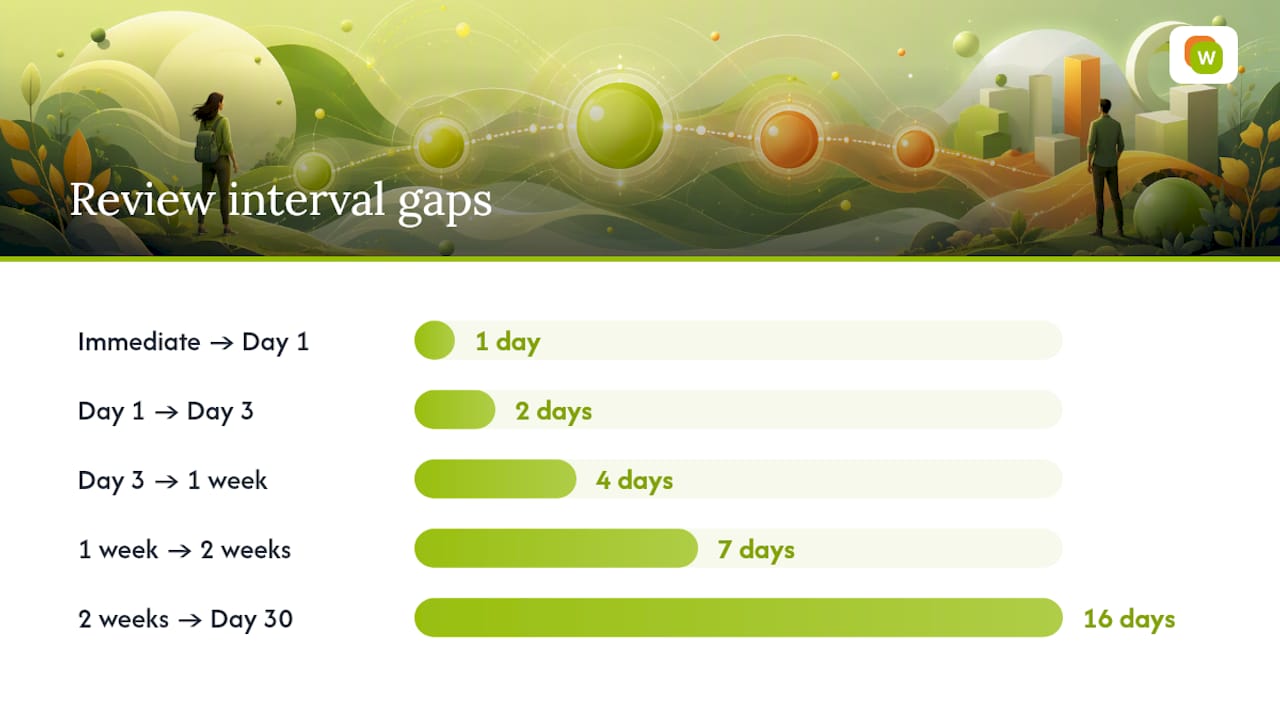
Spaced repetition is the backbone. The mechanics are simple: you review a new word almost immediately, then again a day later, then three days later, then a week, then two weeks, then a month, with the gaps widening every time you get it right and shrinking whenever you get it wrong. You don’t need to build this schedule by hand. Any spaced repetition system (SRS) calculates it automatically based on how you perform on each card.
Card design matters more than people expect. A common mistake, especially with large shared decks, is cramming multiple definitions, example sentences, and grammar notes onto a single overloaded card. Large shared Anki decks often benefit from being consolidated into one clean card per word rather than juggling several competing definitions for the same term. Keep each card to one word, one clear definition, one example sentence, and audio if you can get it. A cluttered card slows down every single review, and you’ll be doing hundreds of reviews.
Beyond flashcards, active-use drills push a word from “recognized” to “usable”:
- Sentence writing. Write one new sentence with the word, different from the one you captured it in.
- Speaking aloud. Say the word and your sentence out loud, even alone. This catches pronunciation issues flashcards never will.
- Typing practice. Type the word from memory rather than selecting it from a multiple-choice list, which forces full recall instead of recognition.
- Mixed review sessions. Rotate between reading the word, hearing it, and producing it, rather than drilling the same mode 50 times in a row.
Here’s a simple schedule you can copy directly:
| Day | Action |
|---|---|
| Immediate | Capture word and first review |
| Day 1 | Second review |
| Day 3 | Third review |
| One week | Fourth review |
| Two weeks | Fifth review |
| Day 30 | Sixth review, then extend interval if correct |
Retiring a word matters just as much as learning it. A word that you’ve answered correctly five or six times in a row across a month, or that you haven’t needed to review in several months without lapsing, can move to an archive rather than clutter your active queue. Keeping an archival workflow where mastered words get pulled out of daily rotation, but not deleted, keeps your review sessions short and your list exportable for later reference.
If you want extra reinforcement beyond straight recall, pairing new words with a memory hook works well for anything abstract or hard to visualize. Mnemonic techniques tend to help most with words that don’t have an obvious image or story attached, like abstract nouns or grammar particles.
Building a consistent review habit is less about motivation and more about attaching it to something you already do daily. Language learners who tie new study habits to an existing routine, like reviewing five cards with morning coffee, stick with it far longer than those who rely on remembering to “find time” later.
What Tools and Workflows Turn Capture Into Real Retention?
The tools you use fall into three rough categories: capture tools that grab words as you encounter them, list-builder tools that generate candidates from a full text, and review tools that schedule and test what you’ve saved. Most learners end up stitching two or three of these together, which is exactly where friction creeps in.
The end-to-end workflow looks like this:
- Capture: highlight or click on an unfamiliar word wherever you encounter it, on a webpage, in a PDF, or in a video’s subtitles.
- Tag: attach a topic, priority, and mastery stage before you forget why you saved it.
- Import: bring in any words you’ve collected elsewhere, from a spreadsheet, a shared Anki deck, or a Quizlet set.
- Schedule: let a spaced repetition system decide when each word comes back up for review.
- Track: check your progress across sessions so you know if your review habit is actually holding.
Dedicated word-list builder tools, particularly ones aimed at teachers and structured learners, organize vocabulary by phonics, morphology, and part of speech and come with ready-made activity templates. That’s genuinely useful if you’re building lists from scratch or teaching someone else. But for a self-directed learner pulling words from articles, videos, and documents you’re already consuming, a tool built around that exact behavior removes several manual steps.
This is precisely the gap WordByWord is built to close. Two features do most of the heavy lifting. Spotlight mode highlights words directly on whatever page you’re reading, color-coded by how well you already know them, from completely unknown to fully mastered, so the words worth your attention are visually obvious without any manual tagging. Comprehension level tells you, before you commit to reading an article or watching a video, roughly what share of its vocabulary you already know, so you can tell in advance whether the content matches your level or will bury you in unfamiliar words.
From there, the workflow closes the loop automatically. Words you click on in a browser, a PDF, or YouTube subtitles across more than 50 languages get saved straight into a collection. Those collections can be built by hand, generated by AI from a prompt, or imported from an existing Anki or Quizlet deck via CSV, so nobody starting with WordByWord has to abandon a study system they’ve already invested time in. Review happens through customizable flashcards with voiceover across seven training modes, including typing, sentence building, and a 60-second sprint, all scheduled by spaced repetition behind the scenes.
On privacy and sync: browser-based capture tools generally fall into two camps, ones that store everything locally on your device, and ones that sync your collections to the cloud so you can review on your phone later without redoing the capture step. Cloud sync is worth the tradeoff for most learners, since the entire point of a personal list is reviewing it anywhere, not just where you first captured it. If you’re weighing free tools against paid ones for this kind of workflow, it’s worth comparing freemium language apps before committing, since usage limits vary a lot between them.
What Starter Templates Can You Copy Today?
Staring at a blank list is its own form of procrastination. A starter template gives you enough structure to begin immediately, and you can prune or expand it once you see how it fits your actual reading habits.
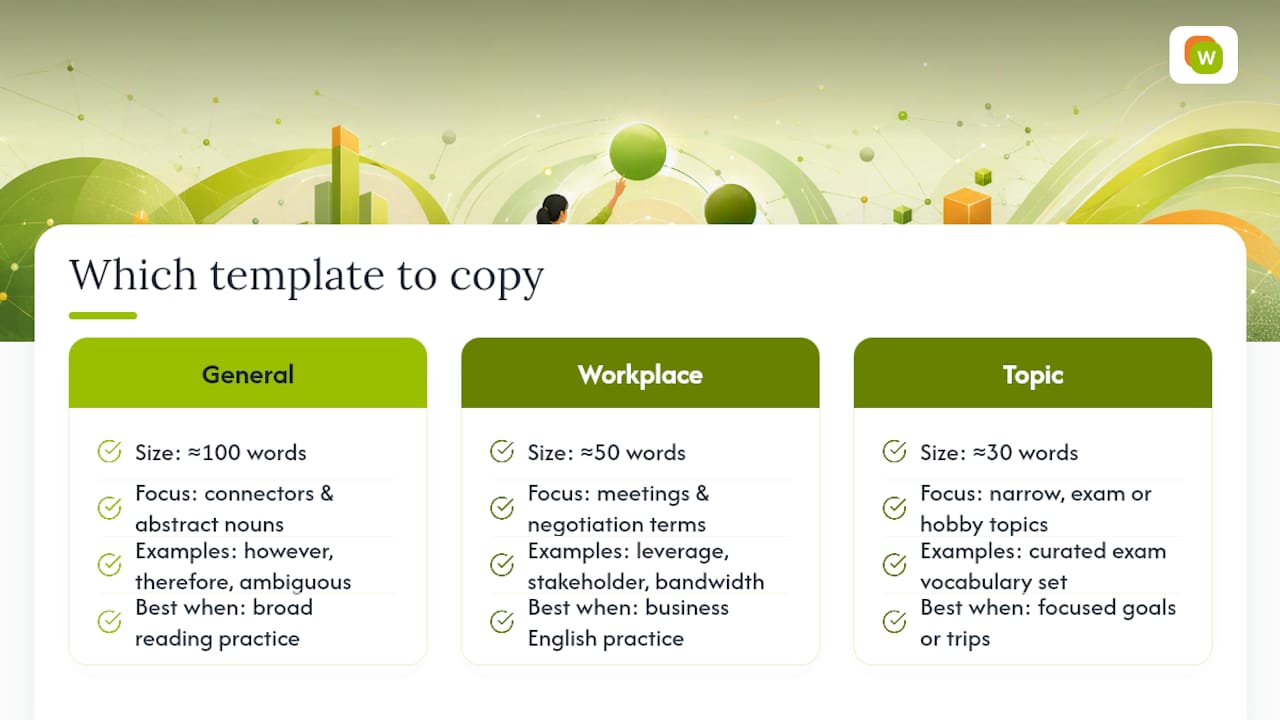
General 100-word seed list. Cover common connectors and abstract nouns that show up across nearly any topic: however, therefore, despite, nonetheless, consequently, ambiguous, sufficient, arbitrary, inevitable, plausible. These words repeat constantly across news articles, essays, and formal conversation, which makes them worth learning even before you have a specific goal in mind.
Workplace 50-word seed list. Focus on meeting and negotiation language: leverage, stakeholder, deliverable, bandwidth, escalate, align, touchpoint, deadline, mitigate, onboard. A ready-made business English vocabulary collection covers this ground if you’d rather import a finished set than build one from scratch.
Topic-based 30-word seed list. Pick one narrow theme tied to something you’re actually working toward, exam prep, a hobby, an upcoming trip, and keep the list tight. A curated exam vocabulary set, for instance, works because it’s scoped to exactly what a specific test covers rather than trying to be comprehensive.
To adapt any of these to your own level: strike out words you already know cold, and swap in two or three words from something you’ve read this week. Import the result as a CSV if your review tool supports it, since retyping 50 to 100 words by hand is exactly the kind of friction that makes people quit before they start.
When customizing a template, decide upfront which fields you’ll actually fill in every time. A part-of-speech field is worth keeping for grammatically complex languages. A “source” field is worth skipping if you’re importing a pre-built list where the source is obvious. Every optional field you add is one more thing standing between you and finishing the setup, so include only what you’ll actually use during review, not what looks thorough on paper.
What Mistakes Derail a Personal Vocabulary List, and How Do You Fix Them?
Most abandoned vocabulary lists fail for the same three reasons, and all three are fixable in under ten minutes.
- Chasing rare words over useful ones. Capturing every unusual word in a novel feels productive, but if you’ll never use “vermilion” or “gossamer” in conversation, it’s crowding out words you’ll actually need.
- Skipping context on capture. A word saved without its sentence is a word you’ll have to relearn from scratch in three weeks, because you won’t remember what it meant or how it was used.
- Never using words actively. Recognizing a word on a flashcard and being able to produce it in a sentence are two different skills, and only active practice builds the second one.
A useful prioritization rule combines three factors: frequency (how often you’ll realistically encounter this word again), relevance (does it connect to your actual goals), and practice opportunity (will you get to use it this week, not just recognize it). A word that scores low on all three is a candidate for deletion, not review.
If your list has already ballooned past a manageable size, prune it in one sitting rather than trying to fix it gradually. Sort by mastery stage, archive anything you’ve gotten right five or more times in a row, and delete anything you captured more than two months ago that you still can’t define without checking. Aim to bring an unwieldy list back down to roughly 100 to 150 active words, since saved word lists tend to work best when capped rather than left to grow indefinitely.
Pro Tip: If pruning feels painful, remind yourself that deleting a word from your active list isn’t deleting the learning. Most of what stuck the first time will come right back if you meet the word again in real content later.
How We Build WordByWord Around Real Vocabulary Workflows
Every feature decision we make starts from the same question: what’s the smallest amount of friction between encountering a word and actually retaining it? That question is why Spotlight highlights words on the page itself instead of asking you to open a separate app, and why Comprehension level exists at all.
We built seven distinct training modes, not one, because recognizing a word and producing it under time pressure are genuinely different skills, and a single flashcard format only trains one of them. The 60-second sprint mode exists specifically for the days you have three minutes, not thirty, because a review system that only works when you have a full session free is a review system most people will quietly stop using by week three.
We also built CSV and Anki import because we don’t think anyone should have to abandon a shared deck or a spreadsheet they’ve already put real time into just to switch tools. A learner tracking three languages at once should be able to bring existing work with them, tag it by mastery stage, and let spaced repetition take over from there.
The workflow we see work best, over and over, looks like this: read something you’d read anyway, click the two or three words that actually stop you, and let the review queue handle the rest over the following weeks. It’s less impressive-sounding than a structured curriculum. It’s also the version people actually stick with.
— WordByWord Team
Turn Your Captured Words Into a Review Habit That Sticks
Most of the friction in building a personal vocabulary list happens in the gap between capturing a word and actually reviewing it later, and that gap is exactly what WordByWord is built to close. Instead of switching between a highlighter, a spreadsheet, and a flashcard app, everything happens in one place: click a word on any webpage, PDF, or YouTube video, and it lands in a collection ready for review.
Spotlight mode shows you at a glance which words you already know and which ones need work, right on the page you’re reading, while Comprehension level tells you upfront whether an article or video matches your level before you commit ten minutes to it. Collections can be filled manually, generated by AI from a prompt, or imported straight from an existing Anki or Quizlet deck, so nothing you’ve already built goes to waste. Review happens through seven flashcard modes with voiceover, scheduled automatically by spaced repetition.
The free plan stays free indefinitely with usage limits, and Premium removes them if you want unlimited collections and full access to every training mode. If you want to see the whole workflow in action, start with WordByWord on whatever you’re already reading today.
Sources
For readers who want to dig deeper into the tools and research behind this workflow, these sources cover the specific claims made throughout this guide:
- Automatically generate wordlists for vocabulary learning | Wordsmyth
- Word List Builder - The Literacy Nest