
Pick a focused word list of 8 to 25 words or one grammar target, then generate 10 to 20 sentences using level and topic controls, and edit anything that sounds off before you use it with the help of All About Spelling in Arizona | Christian Homeschool Curriculums. A template-based generator gives you tighter control for drills; an AI generator gives you more variety but needs a closer read. Either way, run one short batch now and check it against the target skill before building a lesson around it.
TL;DR:
- Small, targeted sentence batches improve learning by focusing on one skill at a time and avoiding overwhelming learners with unrelated content.
- Vetting generated sentences with a quick review ensures naturalness and relevance, preventing awkward or overly formal phrases from reaching students.
- Manipulating sentences through transformations like tense shifts or error correction deepens active grammatical judgment beyond passive exposure.
- Using spaced repetition systems to review generated sentences maintains long-term retention and makes practice more efficient.
- Prioritizing quality over quantity and incorporating active transformation drills yields better language mastery than simply increasing the number of sentences.
Table of Contents
- Why Generated Sentences Work (and What Makes One Good)
- Turning Word Lists into a Repeatable Practice Workflow
- Five Drills You Can Run Today with Generated Sentences
- How WordByWord Fits into the Generation-to-Mastery Pipeline
- What the Research Actually Supports (and What Gets Oversold)
- Get More from Every Sentence You Generate
- Sources
Why Generated Sentences Work (and What Makes One Good)
A practice sentence isn’t just any sentence with your vocabulary word in it. It’s a sentence built to drill one specific skill: a verb tense, a sentence type, a grammatical transformation. Random filler sentences might contain the right word, but they don’t force you to notice how it behaves in context. Effective practice sentences target skills like tense identification, sentence-type parsing, and grammatical transformations, and they work best in small, repeatable batches rather than one giant dump of examples.
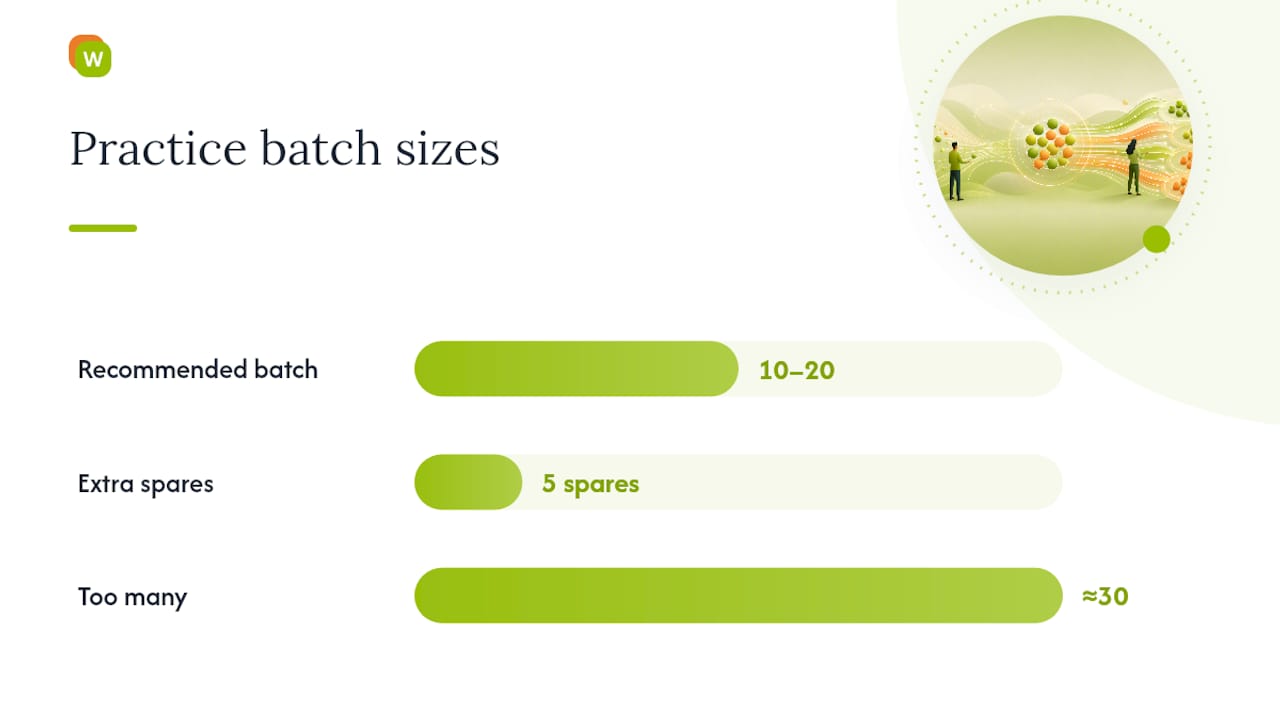
That’s also why batch size matters more than most learners assume. Ten to 20 sentences per session hits a sweet spot: enough repetition to notice a pattern, not so many that you’re skimming by sentence 30.
Before you accept a generated sentence, run it through a short mental checklist:
- Does it use the target word or structure the way a native speaker actually would?
- Does it drill one thing, not three unrelated skills at once?
- Does the difficulty match your level, not the generator’s default?
- Does it read naturally out loud, or does it sound translated?
- Is it short enough to hold in your head after one read?
The controls that matter most when you’re generating are topic or scene, level, tense or grammar structure, and sentence type. Set those four correctly and the quality of your batch jumps immediately, whether you’re using a word-to-sentence tool that turns a comma-separated list into natural output or a broader AI generator.
Pro Tip: Generate five extra sentences beyond what you need. You’ll almost always cut one or two for being awkward or too easy, and having spares saves you a second generation round.
Turning Word Lists into a Repeatable Practice Workflow
Here’s a five-step process that works whether you’re a self-directed learner or planning a lesson for 25 students.
- Assemble your input. Pick 8 to 25 target words, or choose one grammar structure and tense instead of a word list. Shorter, more focused lists produce cleaner, more accurate sentences than long, mixed ones. Trying to cram 40 unrelated words into one batch usually produces sentences that feel forced.
- Set your generator controls. Choose the topic or context, the CEFR level, sentence type (question, imperative, declarative), and target length. Default your batch size to 10 unless you have a specific reason to go higher.
- Generate and vet. Read every sentence once for meaning and once for naturalness. Watch for unnatural collocations, register mismatches (a formal word in a casual sentence), and anything ambiguous enough that two learners could read it two different ways. Cut what doesn’t survive this pass.
- Adapt the survivors into activities. A clean sentence can become a gap-fill, a tense-transformation prompt, a sentence-combining pair, or a speaking cue, depending on what skill you’re actually drilling.
- Export and schedule. Turn the batch into a worksheet, a plain text or CSV file, or import it into a spaced-repetition system for ongoing review instead of a one-off exercise.
A few things trip people up at each step:
- Skipping the vetting pass and handing out sentence 7, which technically uses the word correctly but no fluent speaker would ever say it that way.
- Setting the level too high because the generator’s “intermediate” and your classroom’s intermediate don’t match.
- Forgetting to vary sentence type, so every drill is a declarative sentence and nothing tests question formation or imperatives.
Template-driven generators that let you control length, style, and sentence type make step 2 much faster once you know which settings you actually rely on.
Five Drills You Can Run Today with Generated Sentences
Reading a generated sentence teaches you almost nothing on its own. The real gains come from manipulating that sentence, rewriting it, transforming it, breaking it, and fixing it. Here are five drills built around that idea.
- Tense transformation (15 to 25 minutes). Generate 10 past-tense sentences, then rewrite each one in present, future, and present perfect. This forces learners to track how time markers and auxiliary verbs shift without changing meaning.
- Sentence combination (10 to 20 minutes). Generate pairs of short, simple sentences and ask learners to merge each pair into one complex sentence using a subordinator like “although,” “because,” or “while.”
- Error correction (20 to 30 minutes). Generate 15 sentences and quietly introduce one controlled error into each (wrong verb form, misplaced preposition, subject-verb disagreement). Learners find and fix the error.
- Speaking or writing extension. Hand each student one generated sentence as a prompt and give them 60 seconds to expand it into two or three sentences of their own, spoken or written.
- Micro-practice vs. lesson block. Ten to 15 minutes daily with a small batch beats one 45-minute cram session weekly for retention, though a full lesson block still works for introducing a new structure for the first time.
Pro Tip: Run the error-correction drill with sentences from last week’s tense-transformation exercise. Recycling material this way doubles its value without any extra generation work.
How WordByWord Fits into the Generation-to-Mastery Pipeline
Generating a sentence is the easy part. Remembering it three weeks later is the actual problem, and that’s the gap most generators leave open.
WordByWord closes it by turning generated or pasted sentences into structured, ongoing practice instead of a worksheet you use once and lose. You can build collections by hand, generate them with AI from a prompt, or import a CSV from a spreadsheet or from tools like Anki or Quizlet. Spotlight mode then highlights vocabulary directly on any page by how well you know it, and the comprehension-level indicator tells you whether a text or generated set actually matches your level before you commit time to it.
Here’s where each approach earns its place:
| Situation | Better fit |
|---|---|
| One-off drill for tomorrow’s class | Standalone generator |
| Quick check on a single grammar point | Standalone generator |
| Building vocabulary that needs to stick for months | WordByWord collections + spaced repetition |
| Managing several languages or ongoing curriculum | WordByWord |
Once a sentence earns its place in your practice, save it to a collection, convert it into a flashcard, and run it through sentence-builder or typing modes on a spaced-repetition schedule. That’s the difference between generating practice sentences and actually retaining what they taught you.
What the Research Actually Supports (and What Gets Oversold)
Most advice on generating practice sentences treats volume as the goal: more sentences, more variety, more coverage. That’s backwards. The evidence points toward small, deliberately vetted batches that drill one skill at a time, not sprawling sets that touch everything and reinforce nothing.
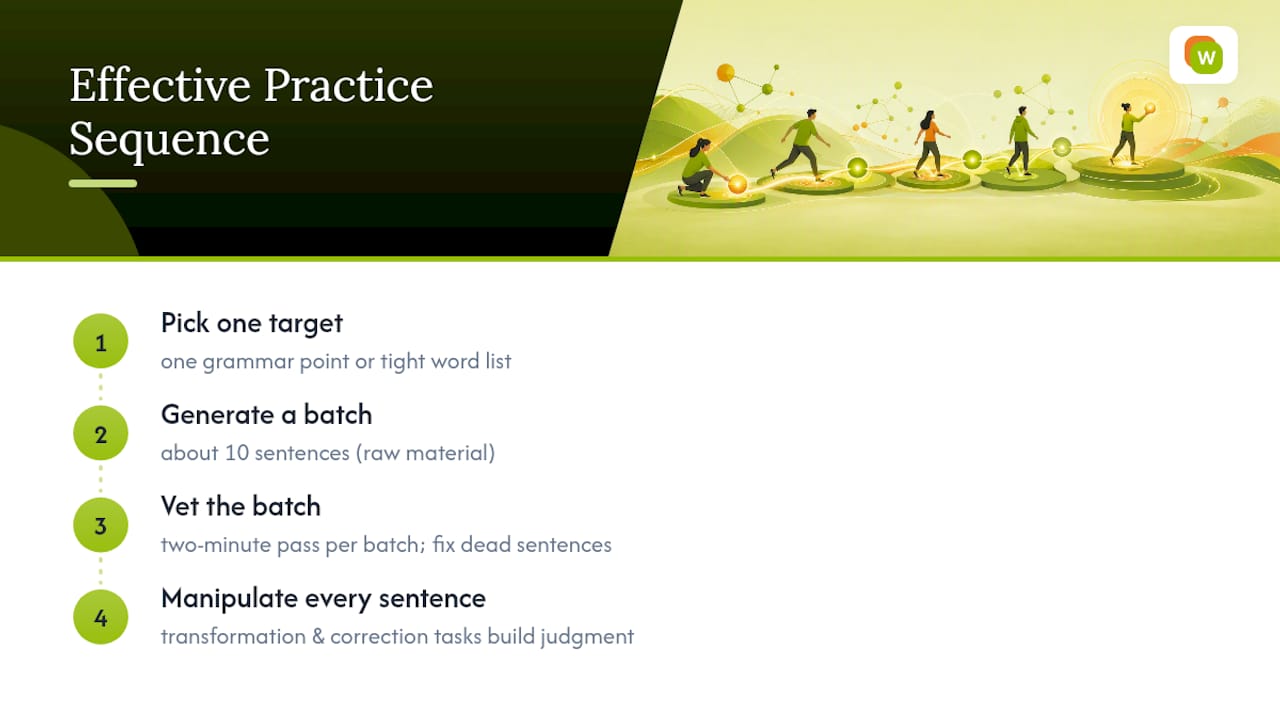
The conventional advice also underweights the vetting step. A generator, template-based or AI-driven, will hand you sentences that are grammatically valid but conversationally dead. Skipping the read-through before handing sentences to students is the single most common mistake we see, and it’s an easy one to fix with a two-minute pass per batch.
What should come first: pick one grammar target or one tight word list, generate a batch of 10, and manipulate every sentence in it, don’t just read it. Transformation and correction tasks build the kind of active grammatical judgment that passive reading never will. Generation gets you raw material. What you do with that material next is what actually teaches you the language.
— WordByWord Team
Get More from Every Sentence You Generate
Generated sentences are only as useful as what happens to them after you close the generator tab. WordByWord is the tool that carries a sentence from that first draft through to something you actually remember, without a separate study app or a fixed course structure getting in the way.

Paste a batch of generated sentences into a collection, or build one from scratch with AI from a simple prompt, and WordByWord turns it into flashcards, sentence-builder drills, and typing exercises scheduled by spaced repetition. Spotlight mode then shows you which words in any article, PDF, or YouTube video you’ve already mastered and which still need work, so your next practice session picks up exactly where the last one left off. If you want ready-made sentence sets to start from, the most common French words library and the IT English vocabulary collection are both built the same way: real example sentences, not filler.
The free plan runs indefinitely with no expiration date, just usage limits, so there’s no risk in testing the workflow on your next batch of generated sentences. Start building your first collection and see whether the words you generated today are still there in three weeks.
Sources
- Imitate classic sentences to improve your writing — English Writing Teacher
- Sentencegenerator
- Wordcounter