
TL;DR:
- The most effective way to learn vocabulary through spaced repetition involves a review within 24 hours of initial exposure. Using fixed or adaptive schedules, learners continuously reinforce words over increasing intervals to deepen long-term retention. Automating capture and review with tools like WordByWord helps integrate spaced repetition seamlessly into browsing habits.
The most effective spaced repetition schedule for browser-based vocabulary learning includes a review shortly after initial learning, then at progressively longer intervals over several weeks to cover the forgetting curve well enough for most learners to build lasting vocabulary without an app. West Coast University recommends that first review within 24 hours as the single most important step — skip it and early memory decay is almost guaranteed.
Start today with this checklist:
- Capture 5–10 new words per browsing session (not more)
- Run your first review within 24 hours of encountering each word
- Keep daily reviews to 15–20 minutes maximum
- Use active recall every time: produce the answer before checking
- WordByWord automates capture and flashcard generation directly in your browser, so you never lose a word you meant to study
Table of Contents
- Why a spaced repetition schedule works: the science behind the intervals
- What are the best fixed schedules for beginners?
- How do adaptive algorithms (SM-2 and FSRS) improve on fixed schedules?
- How to implement your schedule while browsing
- What does a realistic daily routine look like?
- How to measure recall and adjust your schedule
- Copyable 4-week plan for browsing-driven vocabulary growth
- Common problems and quick fixes
- Which schedule should you pick?
- Key Takeaways
- Why integrating spaced repetition into browsing beats separate study sessions
- WordByWord turns your browser into a spaced repetition system
- Useful sources
Why a spaced repetition schedule works: the science behind the intervals
The spacing effect is one of the most replicated findings in cognitive psychology. The Cepeda et al. (2006) meta-analysis confirmed that distributing practice across expanding intervals produces dramatically better long-term retention than massed study. The mechanism is straightforward: each time you retrieve a memory after a gap, you force your brain to reconstruct it, which deepens the neural trace. Cramming encodes once; spaced practice encodes repeatedly, each time in a slightly different context.
Retention by study pattern: six 30-minute sessions spread across a week produces a significantly higher retention rate after one week compared to the same amount of time massed into fewer sessions. Same total time, completely different outcome.
The first review is where most learners lose the most ground. Memory decay is steepest in the first 24 hours after initial exposure. A well-timed first review resets the forgetting curve at a higher baseline, making every subsequent interval more efficient. After that, consistency matters more than perfect timing. Missing a review by a day rarely ruins retention; skipping the first review almost always does.
What makes the intervals work:
- Expanding gaps force progressively harder retrieval, which strengthens the memory trace
- Each successful recall resets the forgetting curve at a higher level
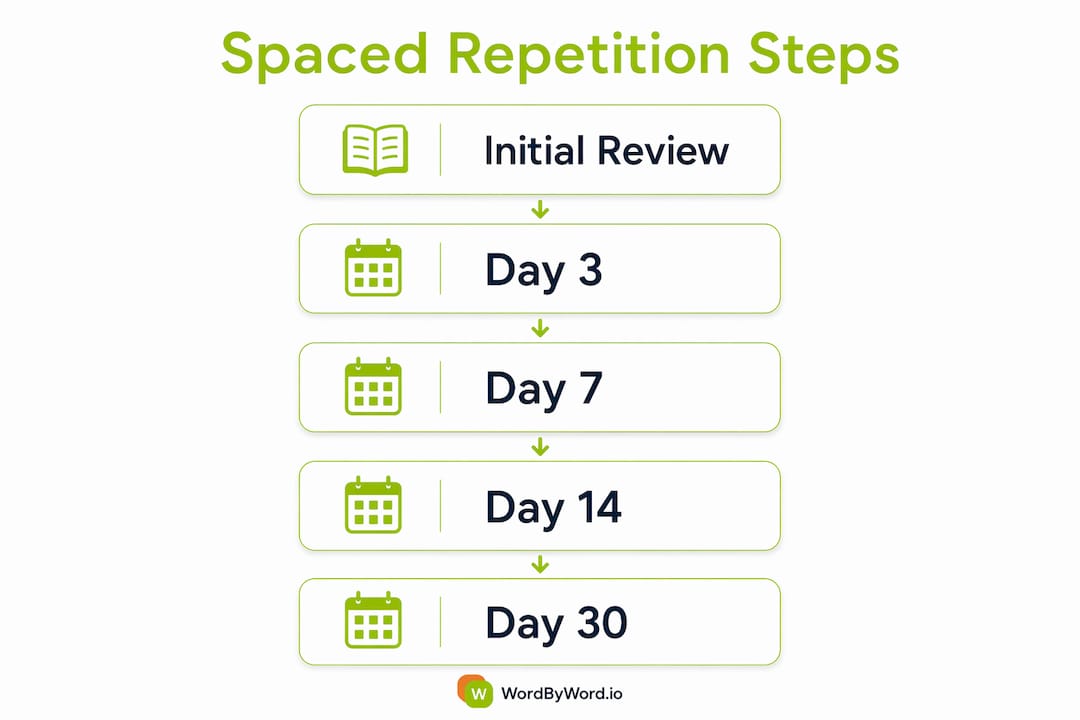
- Short early gaps (day 1, day 3) catch words before they fully fade; longer later gaps (day 14, day 30) confirm consolidation
What are the best fixed schedules for beginners?
Three schedules cover most situations. Choose based on your timeline, not your ambition.
| Schedule | Review days | Best for |
|---|---|---|
| 1–3–7–14–30 | Days 1, 3, 7, 14, 30 | Long-term vocabulary retention |
| 1–3–7–21 | Days 1, 3, 7, 21 | Semester-long subjects, cumulative material |
| 2357 | Days 2, 3, 5, 7 | Exam in 1–2 weeks, fast consolidation |
The 1–3–7–14–30 pattern is the workhorse for vocabulary learners. It approximates the forgetting curve across a full month and works well for decks under 200 words. The 1–3–7–21 variant suits material you need to retain beyond a single exam, especially when later content builds on earlier vocabulary. The 2357 method is purely a short-term tool: it consolidates fast but only schedules through day 7, so anything learned with it still needs to be fed into a longer-interval schedule afterward.
When to use each:
- 1–3–7–14–30: your default for any new vocabulary you want to keep permanently
- 1–3–7–21: language courses with cumulative grammar and vocabulary across months
- 2357: cramming for a test next week, then migrate survivors to 1–3–7–14–30
Pro Tip: Set a hard cap of 10 new cards per day when starting. Review load compounds fast: 10 new words daily means roughly 50–70 reviews per day by week two. Start conservative and raise the cap only when your daily review time stays under 20 minutes.
Schedule calculators like the one at freebrain.net can convert a start date and word count into exact calendar review dates, which removes the mental overhead of tracking manually.
How do adaptive algorithms (SM-2 and FSRS) improve on fixed schedules?
Fixed schedules treat every word identically. Adaptive algorithms treat each card as an individual, adjusting the next interval based on how easily you recalled it.
SM-2 (the algorithm behind SuperMemo and the basis for many SRS apps) works by multiplying the previous interval by an easiness factor between 2.0 and 2.5. Nail a card easily and the next review gets pushed further out. Struggle with it and the interval resets. The default starting sequence is day 1, then day 6, then adaptive from there.
FSRS (Free Spaced Repetition Scheduler, available in Anki since release 23.10) separates two variables: stability (how long a memory lasts) and difficulty (how hard the card is to recall). This separation lets it schedule more precisely. FSRS trims review time roughly 20% compared to SM-2 while holding retention constant, which matters a lot once your deck grows large.
Signals that you’re ready to switch from fixed to adaptive:
- Your deck has grown past 200 words
- You’re spending more than 25 minutes per day on reviews
- You consistently rate cards “easy” but the fixed schedule keeps bringing them back
- You have a growing backlog you can’t clear in one session
How to make the switch:
- Export your current word list (CSV works fine)
- Import into an SRS app that supports SM-2 or FSRS
- Set your target retention rate (85–90% is a practical starting point)
- Let the algorithm run for two weeks before adjusting any settings
- Check your ease distribution: if more than 30% of cards are rated “hard,” simplify those prompts before tuning intervals
How to implement your schedule while browsing
You can capture, card, and schedule a new word during normal browsing in under 60 seconds. The workflow is simpler than it sounds.
- Highlight an unknown word on any webpage, PDF, or YouTube subtitle using WordByWord
- Translate it instantly and confirm the meaning in context
- Save it to a personalized collection; WordByWord auto-generates a smart flashcard
- Set your daily new-card limit in the app settings (start at 5–10)
- Confirm first-review timing is set to within 24 hours — this is the single step most learners skip
WordByWord features that do the scheduling work:
- Spotlight mode highlights words on any page by mastery level, so you immediately see which words need attention without hunting through a separate list
- Smart flashcards auto-generate review prompts from the words you save, formatted for active recall rather than passive re-reading
- AI trainer schedules reviews using adaptive models, handling the interval math so you focus on retrieval
The biggest activation energy barrier in browser-based learning is the gap between encountering a word and getting it into a review queue. Automating that capture step improves adherence more than any interval tuning.
What does a realistic daily routine look like?
Consistency beats perfect timing, every time. A 10–25 minute daily review block is enough to make real progress; the minimum effective dose for busy learners is about 25 focused minutes, three times per week.
Three time-budget templates:
- 10 minutes: Morning quick-fire review of due cards only, no new words added
- 25 minutes: 10-minute review of due cards + 15 minutes of active browsing with capture
- 50 minutes: Full session: 20-minute review, 20-minute reading with Spotlight, 10-minute end-of-session blurt (write everything you remember without checking)
Micro-study prompts work especially well for browser learners. A 2–5 minute review at the end of a reading session, before you close the tab, costs almost nothing and catches words while context is still fresh. End-of-page blurts (close the page, write the new words you just saw) are underrated for exactly this reason.
Pro Tip: Batch new-word capture during browsing, but spread reviews across the day in short bursts rather than one long session. Two 10-minute review blocks beat one 20-minute block for retention, and they fit into commutes or coffee breaks.

How to measure recall and adjust your schedule
Track these four metrics weekly:
- Review pass rate: aim for 85–90%; below 80% means cards are too hard or intervals too long
- Ease ratings distribution: if more than 25% of cards are rated “hard” consistently, simplify those prompts
- Daily backlog: more than one day’s worth of overdue cards is a warning sign
- Average retention per card type: single-word cards typically retain better than phrase cards early on
Adjustment rules:
- Pass rate below 80%: shorten intervals by one step or rewrite the weakest cards
- Pass rate above 95%: lengthen intervals; you’re reviewing too frequently
- Overdue backlog: set a daily cap and work through it incrementally, never mass-review in one session
- Repeatedly failing a card: rewrite the prompt with more context, not just a simpler definition
WordByWord’s progress tracking shows retention trends per collection, which makes it easy to spot which vocabulary groups need more attention without manually auditing every card.
Copyable 4-week plan for browsing-driven vocabulary growth
Four weeks of consistent daily review at 10 new words per day, with first reviews within 24 hours, will consolidate roughly 200–280 words to a stable recall rate. Here’s how the load builds:
| Week | New words/day | Daily reviews (approx.) | Focus |
|---|---|---|---|
| Week 1 | 10 | 10–20 | Capture + first reviews only |
| Week 2 | 10 | 25–30 | Reviews cascade from Week 1 |
| Week 3 | 10 | 40 | Full schedule running; check ease ratings |
| Week 4 | 5 (taper) | 50–65 | Consolidation; no new cards last 3 days |
Week-by-week actions:
- Week 1: Set up WordByWord, establish the capture habit, confirm 24-hour first reviews are running
- Week 2: Add the 1–3–7 review check-ins to your calendar; watch for cards you keep failing
- Week 3: Review ease distribution; rewrite any card you’ve failed three times
- Week 4: Taper new cards, let the review cascade clear, assess whether to switch to adaptive SRS
Stop adding new cards three days before any exam or checkpoint. Let the existing review cascade complete without new material competing for attention.
Common problems and quick fixes
Backlog pileup: Never mass-review. Set a daily cap of 50–80 reviews, prioritize by difficulty, and let the schedule recalibrate. Clearing 500 overdue cards in one sitting destroys retention and burns you out.
Review fatigue: You’ve added too many new cards too fast. Cut new cards to zero for a week, clear the backlog, then restart at half your previous daily limit.
Passive re-reading instead of recall: If you’re flipping cards and reading the answer without attempting retrieval first, you’re not doing spaced repetition. Cover the answer, produce it, then check. Every time.
Weak card prompts: A card you fail repeatedly is almost always a poorly written prompt, not a hard word. Add a sentence showing the word in context, or break a phrase card into two simpler cards.
Quick checklist for returning after a long gap:
- Do not review everything at once
- Set a daily review cap before opening your deck
- Start with the most recently added words, not the oldest
- Spend the first session only on cards due today; ignore overdue items until day two
For exam-prep situations where you’ve fallen behind, the 2357 method applied to your weakest cards gives faster consolidation than trying to run the full backlog through a 30-day schedule.
Which schedule should you pick?
- Beginner (under 100 words): Start with 1–3–7–14–30, manually tracked or via WordByWord
- Intermediate (100–200 words): Stick with fixed schedules; use a vocabulary builder approach to organize by topic or exam domain
- High-volume (200+ words): Switch to SM-2 or FSRS; manual tracking is no longer practical
One action right now: Open a webpage in your target language, highlight three words you don’t know with WordByWord, and confirm your first review is scheduled for tomorrow. That’s it. The schedule does the rest.
Key Takeaways
A consistent spaced repetition schedule, anchored by a timely first review, produces dramatically better vocabulary retention than any amount of cramming or passive re-reading.
| Point | Details |
|---|---|
| First review within 24 hours | Missing this single step causes the steepest early memory decay; schedule it automatically. |
| Fixed schedules for small decks | The 1–3–7–14–30 pattern works well for decks under 200 words and requires no app. |
| Switch to adaptive at 200+ words | SM-2 or FSRS reduces review time roughly 20% vs. fixed schedules at similar retention. |
| Consistency over perfection | 25 focused minutes three times per week beats sporadic long sessions for long-term retention. |
| WordByWord automates the workflow | Spotlight, smart flashcards, and the AI trainer handle capture, card creation, and scheduling inside your browser. |
Why integrating spaced repetition into browsing beats separate study sessions
The conventional advice is to block out dedicated study time for vocabulary. Set aside 30 minutes, open your flashcard app, grind through your deck. That works, but it also requires a level of friction that most people don’t sustain past week three.
What actually sticks for vocabulary, specifically, is context-rich, high-frequency exposure. When you encounter a word while reading something you genuinely care about, the surrounding meaning gives the memory a hook. A word learned from a news article about a topic you follow lands differently than the same word on a decontextualized flashcard. The browsing context is doing cognitive work that a standalone study session can’t replicate.
The practical implication is that the best time to schedule a word’s first review is within minutes of encountering it in the wild, not hours later when you’ve opened a separate app. WordByWord’s Spotlight mode makes this concrete: it surfaces unknown words directly on the page you’re already reading, so the capture moment and the context moment are the same moment. That’s not a convenience feature. It’s the mechanism that makes the first review actually happen within 24 hours, which is where most learners lose the most ground.
Integrated learning also distributes exposure naturally across the day. Five words captured during a morning news read, three from a YouTube video at lunch, four from a work document in the afternoon — that’s twelve words encountered in real contexts, already partway through their first review cycle, without a single dedicated study block. The schedule runs in the background; the learning happens in the foreground.
WordByWord turns your browser into a spaced repetition system
Every word you encounter while browsing is a potential vocabulary gain — but only if it gets captured and reviewed at the right time. WordByWord closes that gap.

WordByWord highlights unknown words directly on any webpage, PDF, or YouTube subtitle using Spotlight mode, auto-generates smart flashcards from words you save, and schedules reviews through its AI trainer so your first review always lands within 24 hours. You get progress tracking, personalized collections, and CSV export for learners who want to move into a dedicated SRS app as their deck grows. No separate study sessions required. The extension works across 50+ languages, and the free tier covers the core vocabulary and translation features you need to start today. Add WordByWord to your browser and run your first capture session on the next page you read.
Useful sources
Key studies and tools referenced in this guide:
- Cepeda et al. (2006) — The foundational meta-analysis on the spacing effect, showing that distributed practice produces dramatically better long-term retention than massed study. Summarized via freebrain.net’s schedule generator.
- West Coast University study skills guidance — Recommends the first review within 24 hours as the single most critical intervention against early forgetting.
- LongTerm Memory Blog — Science-based study schedule optimization covering distributed sessions, the minimum effective dose, and the 2-day rule.
- StudyCards AI schedule guide — Detailed breakdown of fixed and adaptive schedules, including FSRS efficiency comparisons and backlog handling.
- CalcBee Spaced Repetition Scheduler — Interval multiplier calculator for tuning base intervals and multipliers for different material types.
- PrepAdmit spaced repetition guide — Exam-prep focused guide on building review routines and habit formation for test preparation.
- Wikipedia: Spaced repetition — Covers the Leitner system, SM algorithm family, FSRS, and the history of SRS software implementation.