
TL;DR:
- WordByWord is the best pronunciation app for language learners who read daily content and want integrated practice. It captures phrases from web content and provides AI feedback on pronunciation, helping reinforce reading, speaking, and retention simultaneously.
For language learners who already use AI-enhanced browsing to build vocabulary, WordByWord is the best pronunciation app available right now. The reason is specific: it captures phrases directly from web pages, PDFs, and YouTube, then ties AI pronunciation feedback to the same words you’re actively learning — so speaking practice and reading comprehension reinforce each other instead of competing for your time.
If you want the short version: install the browser extension, highlight a phrase from whatever you’re reading, and run the AI pronunciation trainer on it. The rest of this article explains why that workflow beats isolated-word drills and how to get the most out of it.
Table of Contents
- Why WordByWord is the best pronunciation app for browser-based learners
- How to choose the right pronunciation app for your goals
- What the research says about effective pronunciation practice
- How to use WordByWord to improve pronunciation step by step
- Platform support and what to expect from pricing
- Key Takeaways
- The case for integrating pronunciation into your reading habit
- Start your free trial of WordByWord today
- Useful sources and further reading
Why WordByWord is the best pronunciation app for browser-based learners
Most pronunciation apps treat speaking practice as a separate activity. You open the app, drill a word list someone else built, close it, and go back to reading. WordByWord removes that gap entirely.
The browser extension works across websites, PDFs, and YouTube subtitles. When you highlight a word or phrase, it doesn’t just translate — it pulls that item into a personalized practice collection. From there, the AI pronunciation trainer gives you feedback on how you said it, and the flashcard system reinforces both the meaning and the spoken form through spaced repetition. That combination of production practice with spaced retrieval is a well-established principle in instructional design: linking spoken practice with flashcards improves retention of both recognition and production.

Who this fits best: learners who read in their target language daily (news, articles, YouTube), want short practice sessions that don’t require switching apps, and care about tracking vocabulary growth alongside pronunciation progress.
Core strengths at a glance:
- AI feedback detail: phoneme-level and prosody feedback tied to real phrases you captured, not generic word lists
- Visual feedback: soundwave display and stress markers that make your speech measurable
- Practice modes: phrase-level practice, sentence repetition, shadowing, and flashcard-based recall
- Integrations: browser extension, YouTube subtitle capture, PDF highlighting
- Platforms: web browser (Chrome and compatible browsers), with mobile support
- Progress tracking: vocabulary collections with mastery levels, exportable via CSV
Pro Tip: Use Spotlight mode first. It highlights words on the page by how well you know them, so you can immediately spot which phrases are worth adding to your pronunciation queue — instead of drilling words you already know.
How to choose the right pronunciation app for your goals
The single most useful question to ask before downloading anything: does this app practice phrases or just isolated words? Focusing only on isolated words is one of the most common pitfalls in pronunciation training. Connected speech, rhythm, and intonation only emerge when you practice in phrases — that’s where stress patterns and reductions actually happen.
AI feedback quality is the second filter. Vague correctness scores (“85% accurate”) tell you almost nothing. Effective AI feedback gives you tactical cues: where your pacing stalled, which vowel shifted, whether your pitch dropped where it shouldn’t. If an app can’t tell you what to change physically, it’s not accelerating your improvement.
Visual feedback matters more than most learners expect. Soundwave displays and stress-marker graphs turn an abstract skill into something you can see and compare. Research highlights from user studies on visualizer tools show they increase both perceived usefulness and actual learning effectiveness.
Red flags to walk away from:
- Generic feedback with no phrase-level practice
- No progress tracking or export options
- Unclear privacy policy around voice recordings
- No integration with the materials you’re actually reading
Matching criteria to your situation: if you’re a reading-heavy learner who consumes content in English daily, you need an app that captures phrases from that content — not one that forces you into a separate curriculum. If you’re preparing for professional communication, pacing and pitch feedback matter more than accent mimicry.
What the research says about effective pronunciation practice
Short, frequent sessions beat long, infrequent ones. Practitioners consistently recommend 5–10 minutes of daily targeted speaking practice for motor learning — the kind of neuro-muscular adaptation that makes pronunciation feel automatic rather than effortful.
Phrase-level practice is non-negotiable for natural-sounding speech. Intonation, rhythm, and connected speech only develop when you practice in context, not word by word.
Here’s a daily routine that works:
- Capture one phrase from whatever you’re reading or watching (a sentence from an article, a subtitle from YouTube).
- Listen to the native audio at normal speed, then slowed down.
- Shadow it — speak along with the audio, matching rhythm and stress.
- Record yourself and compare your soundwave to the model.
- Review AI feedback — focus on pacing and pitch, not just phoneme accuracy.
- Add the phrase to your flashcard deck and review it the next day.
The entire cycle takes 5–10 minutes. Done daily, it compounds fast.
Learners who pair AI feedback with a basic understanding of IPA progress faster because IPA points to articulation targets rather than relying on repeated trial-and-error. — Cambridge Dictionary pronunciation guide
Pro Tip: Supplement your phrase practice with YouGlish — paste any phrase and hear it spoken by dozens of real speakers in different contexts. It’s the fastest way to calibrate what natural intonation actually sounds like.
How to use WordByWord to improve pronunciation step by step
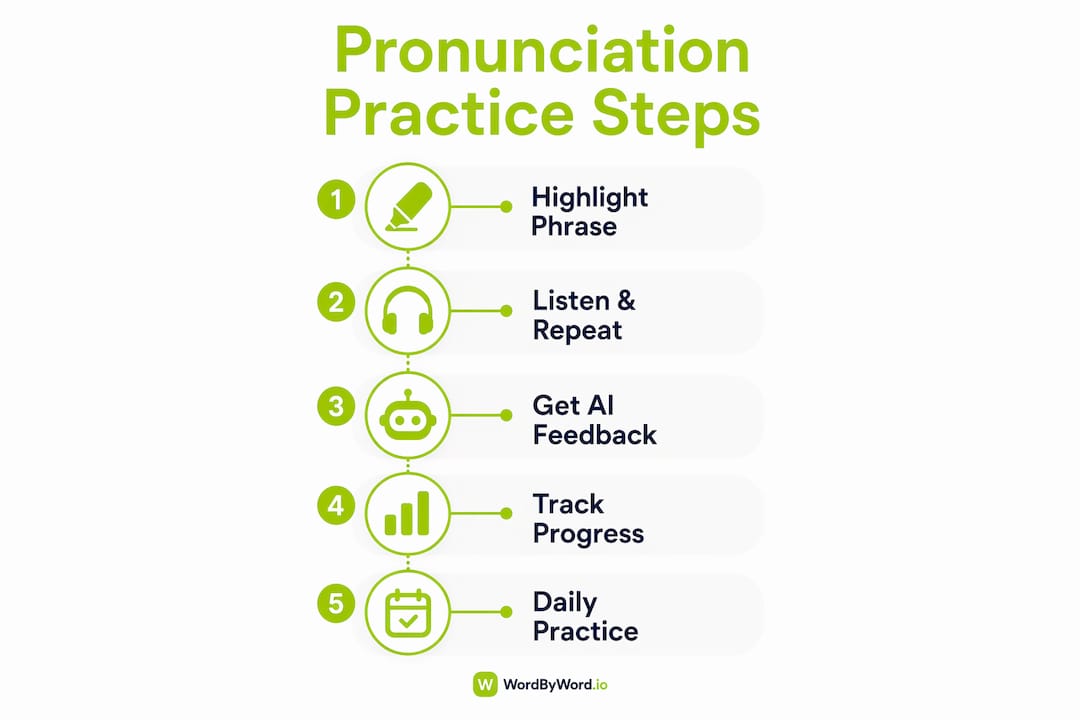
A typical WordByWord session looks like this:
- Browse normally. Read an article, watch a YouTube video, or open a PDF.
- Highlight a phrase that’s unfamiliar or that you want to practice saying.
- Add it to a collection. WordByWord saves it with translation and context.
- Run the AI pronunciation trainer. Speak the phrase aloud and receive feedback.
- Review the soundwave. Compare your stress pattern to the model.
- Add to flashcards. The spaced repetition system schedules your next review automatically.
- Track progress. Mastery levels update as you practice, and you can export your collection via CSV.
Feature mapping:
| Practice dimension | How WordByWord addresses it |
|---|---|
| AI feedback detail | Phoneme and prosody feedback on captured phrases |
| Visual feedback | Soundwave display and stress markers |
| Practice modes | Phrase practice, shadowing, flashcard recall |
| Integrations | Browser extension, YouTube subtitles, PDF highlighting |
| Platforms | Web browser, mobile-compatible |
| Progress tracking | Mastery levels, personalized collections, CSV export |
Privacy note: WordByWord processes voice recordings to generate pronunciation feedback. Before using any pronunciation app, check its privacy policy to understand how recordings are stored and whether they’re used for model training. WordByWord’s policy is available on its website.
Pro Tip: Use Spotlight mode before you start a session. It color-codes words on the page by familiarity, so you can scan a paragraph in seconds and pick the phrases most worth practicing — the ones you almost know but haven’t fully locked in.
Platform support and what to expect from pricing
WordByWord runs as a browser extension with web app support, which means it works wherever you browse — no separate app to open, no context-switching. YouTube subtitle capture and PDF highlighting are built in, covering the two content types most language learners use most.
Pricing shape: WordByWord uses a freemium model. The free tier gives you core vocabulary and translation features — enough to test whether the workflow fits. The paid subscription unlocks unlimited collections, enhanced voiceover, AI-powered exercises, and advanced personalization. That’s the standard paywall shape for pronunciation practice software: basic features free, depth behind a subscription.
Before upgrading, run the free tier for one full week of daily 5–10 minute sessions. If you’re hitting collection limits or want richer AI feedback, that’s your signal to move to paid. Annual billing typically costs less than monthly, so if the habit sticks after two weeks, the annual plan is the better value.
Technical checklist before you start: confirm your browser allows microphone access for the extension, check that your device has enough storage for audio playback, and verify that CSV export works if you want to back up your vocabulary data externally.
Key Takeaways
The most effective pronunciation practice for browser-based learners combines phrase capture from real content, daily 5–10 minute sessions, and AI feedback that targets pacing and pitch — not just phoneme accuracy.
| Point | Details |
|---|---|
| Phrase practice beats word drills | Intonation and rhythm only develop when you practice in connected speech, not isolated words. |
| Daily short sessions win | 5–10 minutes of daily practice produces better motor learning than one long weekly session. |
| Visual feedback accelerates progress | Soundwave and stress-marker displays make speech measurable and give you something concrete to adjust. |
| Evaluate AI feedback quality | Look for tactical cues on pacing and pitch, not just a generic accuracy score. |
| WordByWord integrates practice into browsing | Capture phrases from any webpage, PDF, or YouTube video and run pronunciation training without switching apps. |
The case for integrating pronunciation into your reading habit
The conventional wisdom says pronunciation and vocabulary are separate skills to develop separately. That framing is wrong, and it costs learners months of progress.
When you practice speaking the same phrases you’re actively reading, two things happen simultaneously: your comprehension deepens because you’re processing the language at multiple levels, and your pronunciation improves because the phrases carry real context, not artificial drill sentences. The brain encodes both more durably.
Most pronunciation apps ignore this. They hand you a curriculum built for a generic learner. WordByWord inverts the model: your reading material becomes your pronunciation curriculum. That’s not a minor UX difference — it’s a fundamentally different theory of how adults acquire spoken fluency. For learners who are already reading in their target language daily, it’s the approach that actually matches how they learn.
Start your free trial of WordByWord today
If you’ve been treating pronunciation practice as something separate from your daily reading, WordByWord closes that gap. Install the browser extension, open any article or YouTube video in your target language, and highlight one phrase you want to practice saying. That’s the whole onboarding.
In your first 10 minutes, test these three things: phrase capture from a live webpage, the AI pronunciation trainer on one sentence, and the Spotlight mode vocabulary map. Those three features together are what separate WordByWord from standalone pronunciation practice software.
The free tier covers core features. When you hit collection limits or want deeper AI feedback on pacing and pitch, that’s when the paid plan earns its cost. Start with the free tier and let the daily habit tell you whether to upgrade.
Useful sources and further reading
- The CMU Pronouncing Dictionary — open phoneme lexicon using ARPAbet; useful for understanding how apps map words to phonemic targets in North American English.
- Cambridge Dictionary pronunciation guide — practical IPA reference; helps learners understand articulation targets alongside AI feedback.
- YouGlish — real-world video clips showing words and phrases in natural speech across many speakers and contexts.
- GetPronounce practitioner guidance — practitioner recommendations on daily practice frequency and motor learning for speech.
- WordByWord feature pages — full documentation of browser extension capabilities, Spotlight mode, flashcards, and AI trainer.
- Mejores Apps para Aprender Inglés — Lingo Logic — ELT-focused survey of pronunciation and English-learning apps; useful for a third-party perspective on feature priorities.
- American vs. British English accent differences — LingoLogic — practical guidance on choosing between American and British pronunciation targets when setting up your practice.