
Websites
Articles, docs, forums — a language learning browser extension works on anything you read. Nothing to set up per site, designed to work without changing the page layout.

Select any word on any page — see the translation instantly, hear it spoken, and save it with the context you met it in.

Apprendre des mots étrangers, c'est élargir délibérément son horizon intérieur. Chaque terme nouvellement acquis révèle une perspective insoupçonnée et transforme subtilement notre manière de percevoir le monde. À mesure que le lexique s'enrichit, la pensée gagne en justesse et en clairvoyance, en discernement, ouvrant la voie à une compréhension plus profonde et plus nuancée de la réalité qui nous entoure. Cette quête perpétuelle de savoir enrichit l' esprit...
“This word again. I looked it up already.”
Trainings run on the website — the extension is your collector.
Spotlight colors them right in the text, so you see the gaps before you stumble into them.
Select the word or double-click it: up to ten meanings, pronunciation, your own variant — saved together with the context it came from.
Mark how well you know the word, from 1 to ✓. Trainings take it from there and bring it back right before you would forget.
Every popup is a full dictionary, not a one-line translation: up to 10 meanings as tappable chips, your own translation if you know better, pronunciation on the V key — male or female voice. Switch the language pair right in the popup.


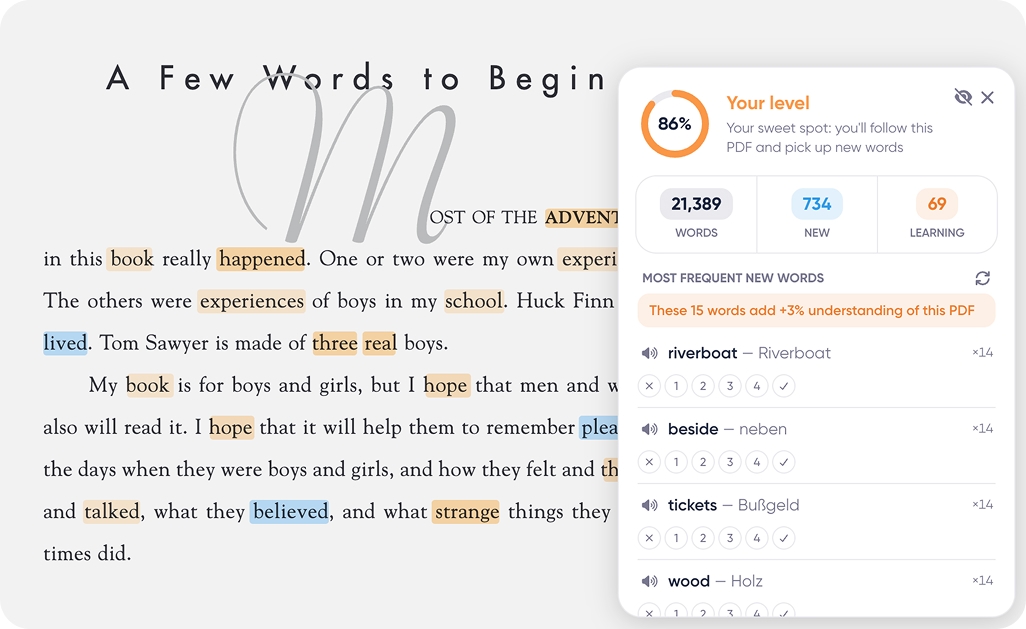
Turn on Spotlight and the page becomes a map of your vocabulary. Blue — words you haven’t met yet. Shades of orange — words you’re learning. No highlight — words you own. Works on articles, YouTube subtitles and PDFs, and updates the moment you save a word.
Ce matin, les pêcheurs remontent leurs filets, et le marché ouvre sous un ciel nuageux. Quelques habitants flânent déjà le long du rivage.
WordByWord scores any article, video or PDF against your vocabulary — not an abstract difficulty level. 95%+ is easy reading, 85–94% is your sweet spot, below 70% — maybe later. And it shows the shortest way up: “these 11 words add +6% understanding of this video.”
Le soleil se couche derrière le rivage, et la mer devient calme.
Pick a status — the word changes color in the text
New, recognized, familiar, learned, known — five steps from first meeting to full ownership. Set them with keys 1–5 right in the popup, or let trainings move words up automatically.
Articles, docs, forums — a language learning browser extension works on anything you read. Nothing to set up per site, designed to work without changing the page layout.
Books and papers open in WordByWord’s own viewer, because Chrome doesn’t let extensions translate inside the standard one. Local files included.
Interactive subtitles: click any word to translate, the video pauses itself and resumes when you’re done. Jump between lines with ← →.
Natural pronunciation for words and phrases, with a choice of male or female voice.
From Spanish and Japanese to Icelandic and Swahili — learn several languages in parallel and keep them separate.
Unlimited translations, audio, flashcards and more.
Anki, CSV or printable PDF, any time.
The extension is free, translating and listening are unlimited. A free account adds saving and Spotlight; Premium removes monthly limits on trainings and AI — see pricing.
One click in the Chrome Web Store. Open any page, select a word — that’s the whole setup.
Any website, YouTube (with interactive subtitles) and PDFs in the built-in viewer. Netflix isn’t supported yet.
50+, from Spanish and Japanese to Icelandic and Swahili — several at once if you like. Here is the full list of supported languages.
Into your vocabulary on wordbyword.io: collections, statuses, trainings — and export whenever you want.
No. The overlay lives in an isolated layer and can’t interfere with a site’s own code or styles.
The extension handles the hardest part: turning what you already read and watch into your personal vocabulary. Add trainings on top, and words move from “seen once” to “known” — that’s comprehensible input plus spaced repetition, the two methods with the strongest evidence behind them.
Most extensions stop after showing a translation. WordByWord also saves the word with its context, tracks your progress and turns it into flashcards and spaced-repetition exercises.
Install in 10 seconds, select your first word, and let the web teach you. Your saved words will be waiting in the vocabulary trainer.
Works on any site, YouTube and PDF