
Which LingQ alternatives actually deliver?
The strongest LingQ alternatives right now are WordByWord, ReadLang, Language Reactor, FluentU, Beelinguapp, Mondly, Mosalingua, Yabla, Lingo Champion, and Hend. Each takes a different angle on the same core problem: how do you build vocabulary and reading fluency from real content without burning out on flashcard drills?
LingQ’s import-heavy model works well if you love curating your own library of articles, podcasts, and ebooks. But plenty of learners want more structure, better video integration, or a lighter setup burden. The table below maps out where each app stands.
App | Pricing | Content types | Import/export | Learning tools | Platforms |
|---|---|---|---|---|---|
• Free tier | • Text | Strong import | SRS, vocab tracking | • Web | |
• Free tier | • Websites | • Import: CSV | Spotlight highlighting, SRS, AI exercises | • Browser extension | |
• Free tier | • Web text | Browser extension | Flashcards, SRS | • Web (PWA) | |
• Free tier | • News | Own uploads + extension | Vocab tracking | • Web | |
• Free tier | • Text | Strong import | Rich vocab tools | • Web | |
• $29.99/mo | • Video | Limited | Quizzes, SRS | • Web | |
• Free with ads | • Parallel text | Limited | Audio sync | • iOS | |
• Free | • YouTube | Export vocab | Subtitle tools | • Browser extension | |
• $12.95/mo | • Video | Limited | Genre/dialect filter | • Web | |
• Subscription | • Visual | Limited | Thematic paths | • Web | |
• Free version | • Video | Limited | SRS, AI chat | • Web |
How do pricing and features compare across these apps?
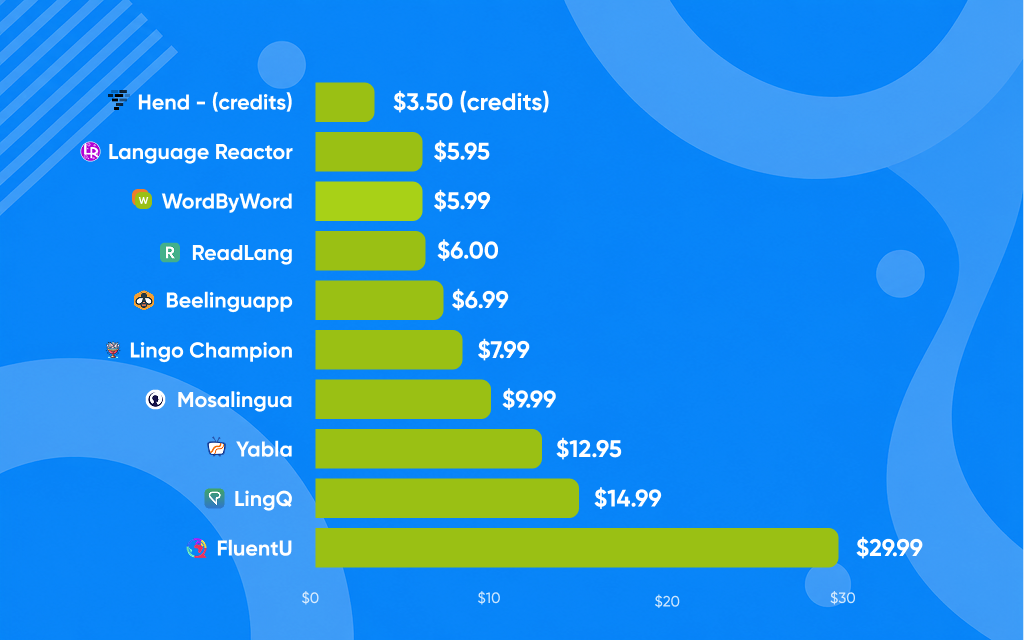
Pricing splits cleanly into three models: freemium subscriptions, pure subscriptions, and one-time purchases.
Mondly itself runs on subscriptions, but its lifetime deal has become a fixture: reseller promotions regularly offer permanent access to all 41 languages for around $99 against a $299.99 list price. That option is unusual in this space and worth noting if you plan to study long-term. Mosalingua runs a limited free version with paid tiers at $9.99/month or $71.88/year, unlocking its full SRS system, AI conversation feature, and curated video library across 10 languages.
FluentU and Yabla are subscription-only. Yabla costs $12.95/month or $99.95/year, and each of its six languages needs a separate subscription. Its video library covers music videos, documentaries, and series with genre and dialect filters, making it one of the more content-rich options for advanced learners. FluentU takes a similar video-first approach but leans harder on interactive captions and quizzes tied to each clip, at $29.99/month or $239.99/year.
Language Reactor is the outlier: the core browser extension is free, with a Pro tier at $5.95/month (or $39.95/year) adding Anki export and enhanced subtitle tools for YouTube and Netflix. For learners already spending time on video content, that integration is hard to beat at the price.
What makes each app’s user experience different?
The gap between these apps shows up most clearly in daily use, not feature lists.

ReadLang keeps things minimal. You browse any webpage, click a word, and get a translation. The vocabulary you tap automatically feeds into a flashcard queue. There’s no onboarding friction, no content library to manage. It suits learners who want a lightweight layer on top of their existing reading habits. Note there is no native mobile app: on a phone you add the web app to your home screen instead.
Beelinguapp takes a parallel-text approach: your target language sits alongside your native language, with synchronized audio narration. It’s particularly good for learners who find pure immersion overwhelming early on, since the dual-text display removes the guesswork.
Language Reactor works as a browser extension for YouTube and Netflix, turning subtitles into interactive vocabulary tools. You can hover over any word for a translation, save it to a list, and export your collection. The experience feels native to how many learners already spend their evenings.
Lingo Champion and Hend both focus on reading with vocabulary support built in. Lingo Champion is built around authentic content: daily news, videos, and your own uploads, plus a Chrome extension that tracks vocabulary on any website you visit. Hend follows the comprehensible-input playbook, importing EPUBs, articles, and YouTube videos and matching material to your current vocabulary level. Keep in mind that Hend is web-only for now, with no native mobile apps.
Combining import-heavy tools like LingQ with guided story-based apps gives you the best of both: breadth from authentic reading and consistency from structured output practice.
Pro Tip: Test the free tier of at least two apps with different approaches before committing. A video-first app like FluentU and a reading-first tool like ReadLang cover different cognitive ground, and most learners benefit from both.
WordByWord brings LingQ-style highlighting to your entire browser
One feature LingQ users consistently cite as their favorite is the color-coded word highlighting system, where each word’s shade reflects how well you know it. WordByWord’s Spotlight mode does exactly that, and it works across websites, PDFs, and YouTube, not just inside a walled content library.
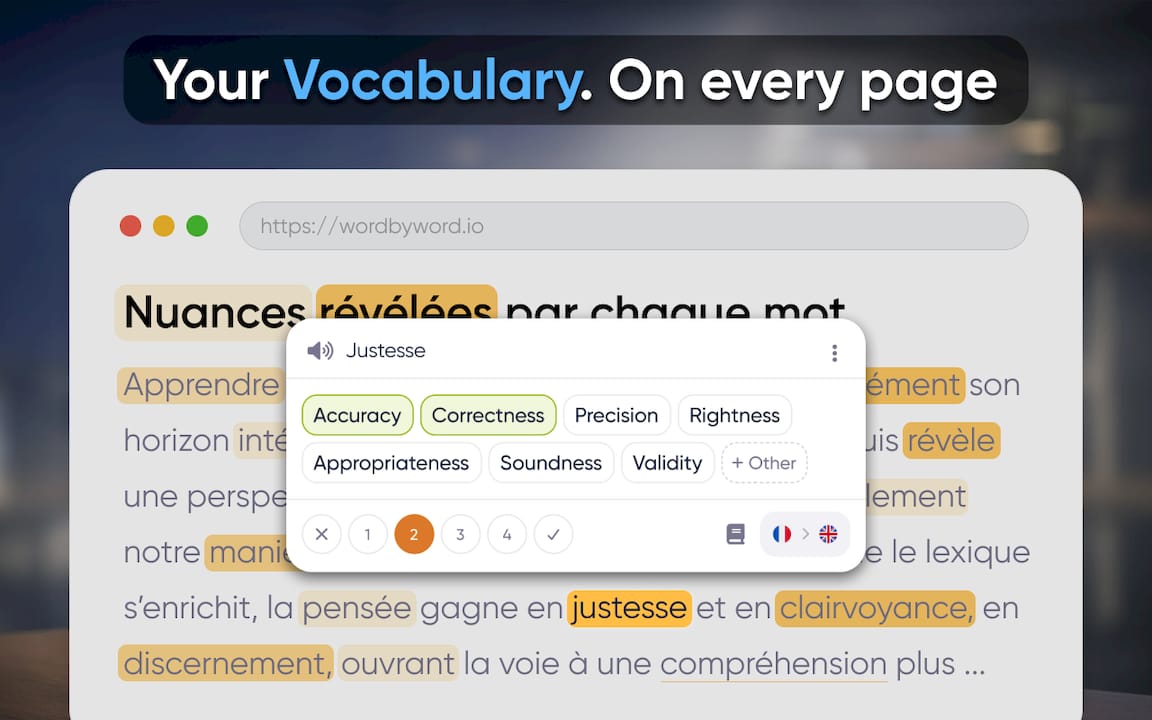
Each highlight color maps to a proficiency status from 1 to 5, so unfamiliar words stand out immediately while mastered ones fade into the background. Open any article, PDF, or YouTube page and you can assess your coverage at a glance before you even start reading. As your vocabulary grows, the highlights shift, giving you a visible record of progress without any manual tracking.
Beyond highlighting, WordByWord adds instant translation on click, AI-generated exercises tied to words you’ve recently seen, and smart flashcards that pull from your actual browsing history. Language learning research consistently shows that learners retain vocabulary better when study fits into existing routines rather than requiring a separate session. WordByWord is built around that principle.
Pro Tip: Use WordByWord on YouTube with subtitles enabled. Spotlight mode highlights unknown words directly in the captions, so you build vocabulary while watching content you’d watch anyway.
Add WordByWord to Chrome — free
How to choose the right app for your learning style
Your best pick depends less on feature counts and more on how you actually spend time online.
Self-directed readers who already collect articles and podcasts will get the most from LingQ or ReadLang, where import flexibility is the core feature.
Multimedia learners who live on YouTube and Netflix should start with Language Reactor or FluentU, both built around video content.
Structured learners who want a clear daily session with a finish line will prefer Mosalingua’s SRS system or Beelinguapp’s guided parallel-text format.
Vocabulary-focused learners who want their study woven into browsing, PDFs, and video will find WordByWord’s Spotlight mode the closest match to LingQ’s highlight system, extended across the whole web.
Budget-conscious learners planning long-term study should look hard at Mondly’s one-time pricing before committing to any monthly subscription.
Test free versions before paying. Most of these apps offer enough in their free tiers to tell you whether the format fits your habits. For Spanish grammar practice alongside any of these tools, pairing a vocabulary app with a dedicated grammar resource covers the full picture.
WordByWord brings LingQ-style vocabulary tracking to every page you visit
The apps compared above each require you to work inside their ecosystem. WordByWord takes a different approach: it comes to wherever you already are.
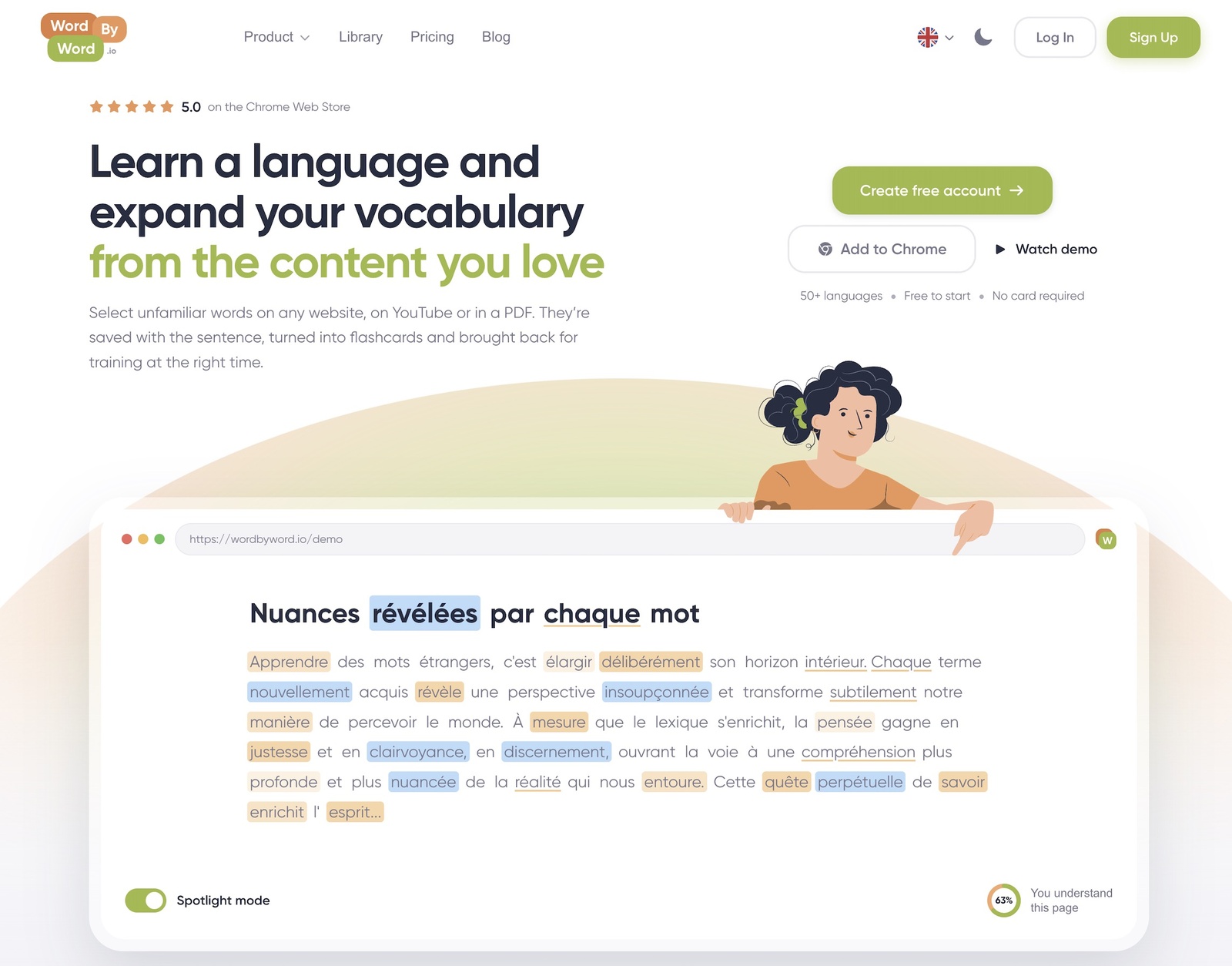
If you’ve ever wished LingQ’s highlight system followed you outside the app, onto news sites, research PDFs, and YouTube videos, that’s exactly what WordByWord delivers. Spotlight mode color-codes every word on any page by your current knowledge level, from first encounter to fully mastered, across 50+ languages. Smart flashcards and AI-powered exercises reinforce what you’ve seen in context, not in isolation. There’s a free tier to start with, and a paid plan that unlocks unlimited collections and advanced AI training. No separate study session required.
Add WordByWord to Chrome — free
Key Takeaways
The best LingQ alternative depends on your learning style: video learners, structured readers, and browser-based vocabulary builders each have a clear best fit.
Point | Details |
|---|---|
Video-first learners | Language Reactor and FluentU integrate vocabulary tools directly into video content. |
Lifetime deal | Mondly’s lifetime deal, sold through regular reseller promos, gives access to 41 languages for around $99 (list price $299.99). |
Structured output | Mosalingua’s SRS system and Beelinguapp’s parallel-text format suit learners who want guided sessions. |
App stacking works | Combining an import-heavy tool with a guided app covers both reading breadth and structured practice. |
WordByWord’s Spotlight mode | Color-coded word highlighting works across websites, PDFs, and YouTube, mirroring LingQ’s system on any page. |


