
TL;DR:
- WordByWord captures words directly from browsing and media to promote long-term vocabulary retention. Its AI drafts contextual flashcards with integrated spaced repetition, reducing manual effort and friction. Using in-page capture and tunable algorithms, it helps learners build vocabulary efficiently during everyday reading.
For language learners who want vocabulary to stick, the best flashcard apps are the ones that capture words where you actually encounter them: inside your browser, on a YouTube video, in a PDF. WordByWord does exactly that. It auto-captures words as you browse, drafts AI-powered flashcards from real context, and schedules reviews using spaced repetition so you’re not grinding the same words you already know.
Three reasons this approach works better than a standalone app:
- Friction drops to near zero. Highlight a word, and it’s in your deck. No tab-switching, no manual typing.
- Science-backed scheduling. SRS plus active recall plus metacognitive confidence ratings is the validated combination for long-term retention, not rote repetition.
- AI does the card-creation work. Auto-generated Q&A pairs, example sentences, and pronunciation audio mean you spend time reviewing, not building.
Table of Contents
- Why do browser-integrated flashcard tools outperform standalone apps?
- What should you look for in a flashcard app for vocabulary?
- How do AI features actually reduce friction and improve retention?
- How does WordByWord meet the decision checklist?
- How do you get started and build a daily routine that actually sticks?
- What do free tiers cover, and when does upgrading make sense?
- What privacy checks should you run before installing a flashcard extension?
- Key Takeaways
- The case for building your vocabulary where you actually read
- WordByWord: start capturing vocabulary during your next browsing session
- Useful sources and further reading
Why do browser-integrated flashcard tools outperform standalone apps?
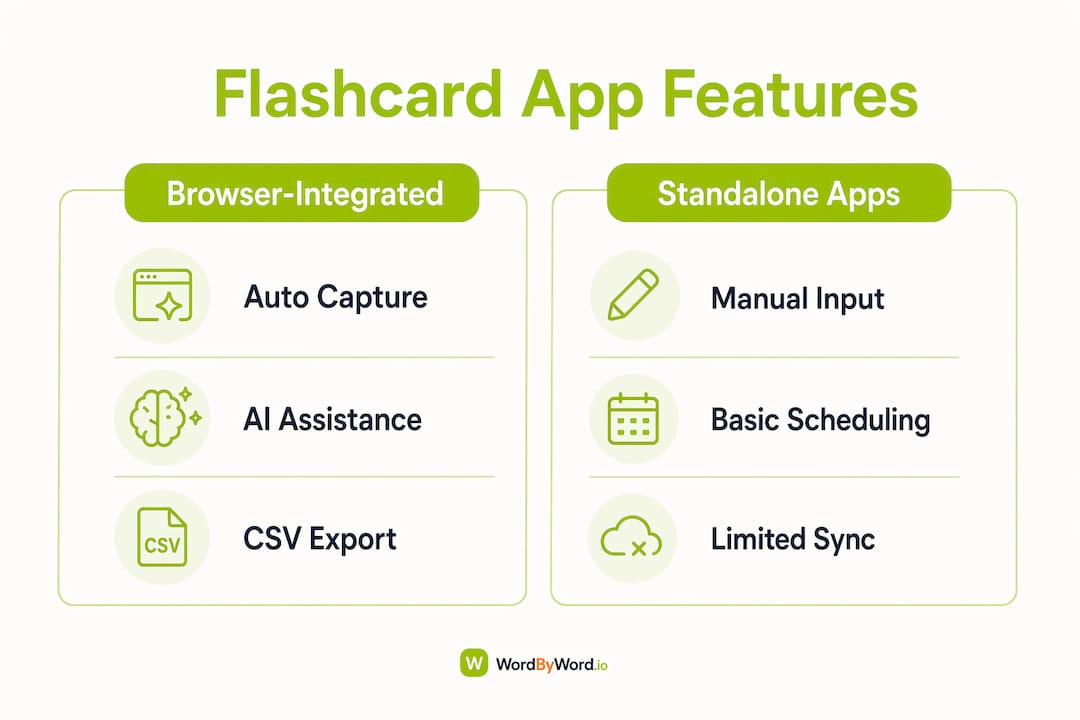
The single biggest reason learners abandon flashcard habits is the friction of building decks. Manual card creation is the primary failure point, and browser-integrated tools that auto-capture words directly address it.
Capturing vocabulary in context, from the exact sentence where you first encountered a word, produces study materials that are more relevant and more memorable than anything you’d type in manually.
When a word lands in your deck with its original sentence attached, you’re not just memorizing a definition. You’re encoding the word’s usage, register, and meaning together. That’s why in-context capture from browsing and media is what professional learners prefer over pre-made or manually typed decks.
Standalone apps require you to stop what you’re doing, open a separate interface, and build a card. Browser extensions eliminate that break entirely. The result: more words captured, more reviews completed, and better retention over time.
What should you look for in a flashcard app for vocabulary?
Not every feature matters equally. Here’s a prioritized checklist for evaluating any digital flashcard tool:
- Browser integration: Can it capture words directly from web pages, PDFs, and video subtitles without leaving the page?
- AI card generation quality: Does it draft contextual Q&A pairs and example sentences automatically?
- SRS algorithm transparency: Can you see and tune the scheduling? FSRS with explicit retention targets (like 90%) is the current standard for efficiency.
- Metacognitive controls: Does it let you rate your confidence after each card, not just mark right or wrong?
- Multimedia support: Audio pronunciation, images, and voiceover for language learners.
- Export/import and CSV support: You should own your data and be able to move it.
- Language coverage: Verify your target language is fully supported, including script and audio.
- Privacy and permissions: What does the extension actually request access to?
Pro Tip: Before installing any extension, check whether it offers CSV export. If it doesn’t, your vocabulary data is locked in. Also look for a visible scheduling settings panel, which signals the algorithm is tunable rather than a black box.
Sophisticated learners consistently prefer visible, tuneable algorithms like FSRS over opaque schedulers. The ability to set a retention target and watch intervals adjust accordingly is a meaningful efficiency gain, not a power-user luxury.

How do AI features actually reduce friction and improve retention?
AI’s biggest contribution to flashcard learning isn’t novelty. It’s time. Card creation is the most time-consuming part of any flashcard workflow, and AI cuts it dramatically.
Here’s what well-implemented AI does in a vocabulary tool:
- Extracts candidate terms from pages, PDFs, and subtitles automatically
- Drafts Q&A pairs with definitions, example sentences, and usage notes
- Generates pronunciation audio so you hear the word, not just read it
- Suggests card formats like cloze deletion or image-based recall for higher-fidelity memory encoding
- Links each card to its source context, preserving the original sentence
Each of these maps directly to a learning principle. Auto-generated example sentences support active recall. Pronunciation audio reinforces phonological memory. Confidence ratings after each review activate metacognition. Auto-generated cards from notes and PDFs demonstrate how integrated capture pipelines scale personalized collections without sacrificing context.
Pro Tip: Always review AI-drafted cards before your first study session. AI card accuracy varies, and a subtle error on a card you review 20 times will cost you more than the time you saved. Keep the original sentence visible on the card so you can spot anything off.
How does WordByWord meet the decision checklist?
WordByWord was built around exactly the workflow this checklist describes. Here’s how its features map to the criteria above:
| Criterion | WordByWord feature |
|---|---|
| Browser integration | Highlight any word on any webpage to capture and translate instantly |
| AI card generation | AI trainer drafts flashcards and generates contextual examples automatically |
| SRS scheduling | Smart flashcard scheduling prioritizes words you’re weakest on |
| Metacognitive controls | Confidence-based review modes built into the training interface |
| Multimedia support | Voiceover, pronunciation audio, and YouTube subtitle integration |
| Export/import | CSV import and export; community-shared collections |
| Language coverage | 50+ languages supported across web, PDF, and YouTube |
| Spotlight visual mapping | Color-coded page overlay shows known vs. unknown words at a glance |
Spotlight is the feature that sets WordByWord apart from most top flashcard software. It turns any webpage into a visual vocabulary map, highlighting words by how well you know them. Open a news article in your target language and you can immediately see whether it’s at your level or too advanced. As you learn, the highlights fade. That visual feedback loop is something no standalone app can replicate.
Pro Tip: Enable Spotlight on a page you’d normally read for pleasure, not study. The words that light up are your real vocabulary gaps, not a curated list someone else decided was important.
How do you get started and build a daily routine that actually sticks?
Setup takes about five minutes. The habit takes a little longer, but the structure is simple.
Quick start:
- Install the WordByWord browser extension from wordbyword.io.
- Open any webpage in your target language and enable Spotlight.
- Highlight three to five unfamiliar words and let the AI draft their cards.
- Review the drafted cards, correct anything off, and add the source sentence if it’s missing.
- Complete your first 10-minute review session.
A realistic daily routine:
- Day 1: Capture 5–10 words during normal browsing. Review all new cards once.
- Days 2–4: Complete the SRS-scheduled reviews (usually 5–10 minutes). Add new words only if you have time.
- Day 5–7: Short consolidation review. Check Spotlight on a new article to gauge progress.
- Weekly: Export your deck as a CSV backup. Review your weakest cards as a batch.
Fifteen minutes a day, done consistently, produces measurable vocabulary gains within a few weeks. The key is letting the SRS algorithm drive the schedule rather than reviewing everything every day.
One caution: streaks can create anxiety and burnout when they become the goal. Track retention and new words learned, not unbroken days. Missing a day doesn’t erase your progress.
What do free tiers cover, and when does upgrading make sense?
Free tiers across most flashcard apps cover the core loop: capture, review, and basic scheduling. That’s enough for casual learners building a few hundred words.
What free tiers typically limit:
- Total number of saved collections or decks
- AI card generation (often capped at a set number per month)
- Offline access and multi-device sync
- Advanced voiceover and pronunciation features
- Detailed progress analytics
Expert reviewers consistently note that serious learners migrate to paid tiers for unlimited content, advanced AI generation, and analytics. The trigger is usually volume: once you’re capturing 20+ words a week and managing multiple language projects, free-tier caps become a real bottleneck.
For exam-focused learners, a vocabulary builder for test prep often justifies premium spending when it unlocks test-formatted practice and graduated recall modes.
Pro Tip: Use the free tier for at least two weeks before upgrading. If you hit the cap naturally, that’s your signal. If you haven’t, you don’t need premium yet.
What privacy checks should you run before installing a flashcard extension?
Browser extensions have broad access by design. That’s what makes them powerful, and what makes a quick privacy check worth doing.
Before you install, verify:
- Permissions requested: Does it need access to all sites, or only sites you activate it on? Narrower is better.
- Data storage: Is your vocabulary data stored locally, in the cloud, or both? Can you delete it?
- CSV export: If the service shuts down, can you retrieve your data?
- Third-party tracking: Does the privacy policy mention sharing data with advertisers or analytics providers?
- Privacy policy clarity: Is it written in plain language, or is it deliberately vague?
A trustworthy extension tells you exactly what it reads, where it stores your data, and how to delete it. If the privacy policy doesn’t answer those three questions directly, treat that as a red flag.
Run a quick test: use the extension without signing in to see what it captures. Check whether deleted words actually disappear from your account. Look for a security or trust page on the product’s website.
Key Takeaways
Browser-integrated, AI-assisted flashcard tools produce better long-term vocabulary gains than standalone apps because they eliminate the manual card-creation step that causes most learners to quit.
| Point | Details |
|---|---|
| Integration beats isolation | Auto-capture from web pages, PDFs, and YouTube removes the friction that kills flashcard habits. |
| SRS + active recall + metacognition | These three principles together, not any one alone, drive durable vocabulary retention. |
| Review AI cards before trusting them | AI drafts save time but need a quick edit pass to catch subtle errors before they get reinforced. |
| Free tiers work until volume grows | Upgrade when you’re consistently hitting collection or AI-generation caps, not before. |
| WordByWord as the recommended tool | Spotlight mode, 50+ language support, CSV export, and browser-native capture make it the strongest fit for this workflow. |
The case for building your vocabulary where you actually read
Most flashcard advice focuses on the app itself. The bigger variable is where the cards come from. A deck built from words you encountered in real reading, in context, attached to the sentence where you first saw them, is more memorable than any pre-made set. That’s not a preference; it’s how memory encoding works.
The tools that make this easy are the ones worth using. WordByWord’s Spotlight mode and in-page capture aren’t features for power users. They’re the core of a workflow that fits into reading you’d do anyway. You don’t need a separate study session. You need a browser extension that turns your existing habits into vocabulary gains.
The privacy checks and SRS tuning matter too, but they’re secondary. Get the capture workflow right first, and the rest follows.
WordByWord: start capturing vocabulary during your next browsing session
Vocabulary growth shouldn’t require a separate study block carved out of your day. WordByWord’s free tier gives you instant word capture, AI-drafted flashcards, and Spotlight visual mapping across 50+ languages, starting in about five minutes.
Upgrade to unlock unlimited collections, advanced AI card generation, enhanced voiceover, and priority sync across devices. It’s the right move when you’re managing multiple language projects or preparing for a high-stakes exam, including exam vocabulary tracking for standardized tests.
Try the free tier at wordbyword.io and run your first Spotlight session on a page you’d read anyway. That’s the whole setup.
Useful sources and further reading
The following sources informed this article and are worth bookmarking for deeper research:
- Lifehacker: The Best Flashcard Apps for Studying: Broad overview of top flashcard software with use-case breakdowns.
- Brainscape on Google Play: Product detail on SRS, active recall, and metacognition implementation.
- Anki: The benchmark for algorithm transparency and offline-first flashcard workflows.
- Flashcards World: Reference for FSRS algorithm with explicit retention-target tuning.
- RemNote: Example of integrated PDF and note-to-card capture pipelines.
- ProdApps: Quizlet Review and Alternatives: Industry analysis on friction, free-to-paid migration, and AI card quality.
- Imprimo: Gizmo AI Flashcards Review: Coverage of algorithm transparency preferences and streak-related burnout risks.