
For most learners, WordByWord is the strongest all-around pick because it turns a quick lookup into a saved word you actually review later. Zhongwen Chinese-English Dictionary and Pleco are the sharpest tools if character-by-character depth is all you need. Migaku fits learners who want lookups to feed a flashcard pipeline. Install the extension, open a news article or a PDF, and click one unfamiliar word to see how it feels.
TL;DR:
- WordByWord is best for learners who want popup lookups that automatically save words for spaced repetition review across websites, PDFs, and YouTube subtitles, supporting over 50 languages.
- Zhongwen provides instant hover lookups for Chinese characters with bilingual definitions, making it ideal for quick reads but without retention features.
- Pleco offers comprehensive Chinese dictionary data, including stroke order and character decomposition, mainly on mobile, and pairs well with browser tools for in-depth study.
- Zhongzhong is a minimal popup designed for lightning-fast single-character lookups without review or review systems.
- Sentence-based tools like Migaku focus on integrating lookups into flashcards for language enthusiasts with existing Anki workflows, emphasizing sentence context over isolated word definitions.
Table of Contents
- What Are the Best Popup Dictionary Tools for Learners?
- How Do These Popup Dictionaries Compare?
- How Do You Choose the Right Popup Dictionary?
- How Does WordByWord Turn Lookups Into Retained Vocabulary?
- When Are Popup Dictionaries Enough, and When Should You Pause?
- Try WordByWord: What the Free Plan Gets You
- Primary Sources Used for Feature Checks
- Sources
- FAQ
What Are the Best Popup Dictionary Tools for Learners?
A popup dictionary that only defines words is doing half the job. The best ones close the loop: you look up a word, it gets saved automatically, and you see it again before you forget it. That distinction separates a handful of standout tools from a much larger pile of lookup widgets that quietly disappear from your workflow after a week.
Here’s the shortlist worth trying, based on what each one actually does well.
WordByWord is built around the idea that vocabulary should come from what you’re already reading or watching, not a separate app you have to remember to open. Click a word on any website, inside a PDF, or in a YouTube subtitle, and it gets translated and logged. The extension’s Spotlight mode highlights every word on the page by how well you know it, from unknown to mastered, so your eyes go straight to what you don’t know yet. Comprehension level tells you what percentage of a text you already understand before you commit to reading it, which is genuinely useful when you’re deciding between two articles at your level. Saved words land in collections you can build by hand, generate with AI from a prompt, or import from Anki, Quizlet, or a CSV file. Review runs through seven training modes, including typing, listening, and a 60-second sprint, scheduled by spaced repetition.
- Best for: learners who want lookups on any site, PDF, or YouTube video to turn into scheduled review, not just a one-time definition.
- Standout: Spotlight mode and Comprehension level, paired with flashcard export and multi-language support across 50-plus languages.
Zhongwen Chinese-English Dictionary is the tool most Chinese learners install first, and for good reason. It’s lightweight, fast, and gives you a bilingual definition the moment you hover over a character or word on a Chinese web page, available for both Chrome and Firefox. It doesn’t try to be a learning system. It’s a lookup tool, and a very good one, which makes it a natural companion to something built for retention rather than a substitute for it.
- Best for: learners who want instant character or word lookups while reading Chinese web pages.
- Standout: direct hover lookup with clean bilingual entries and no setup required.
Pleco is the deepest Chinese dictionary most learners will ever touch, but it lives primarily on mobile rather than in the browser. Its dictionaries go far beyond a simple gloss, breaking characters into components, showing stroke order, and offering handwriting and OCR input for words you can’t type. If you’re doing serious character study, Pleco is hard to beat. It’s just not a browser popup in the way the others on this list are.
- Best for: learners who need exhaustive dictionary data and Chinese-specific tools like OCR and handwriting recognition.
- Standout: character decomposition, spoken audio, and one of the largest mobile Chinese dictionary ecosystems available.
Zhongzhong strips things down even further than Zhongwen. It’s a minimal popup built for one job: fast, single-character lookups while you’re reading. There’s no review system, no flashcards, nothing beyond the definition itself. That simplicity is the appeal for readers who just want the meaning of a character without any friction.
- Best for: quick single-word Chinese lookups with a minimal interface.
- Standout: near-instant hover definitions with almost no visual clutter.
Migaku takes a different approach, built around sentence mining. Instead of just defining a word, it’s designed to help you pull the whole sentence into a flashcard, particularly for character-based languages like Chinese and Japanese. Learners who already have an Anki habit and want their reading to feed it directly tend to like this workflow.
- Best for: learners who want lookups to flow straight into sentence-mining flashcards.
- Standout: deep integration between reading, sentence context, and flashcard export.
Rounding out the field, generalist tools like Definer and Dictionariez deserve a mention. They’re multi-source popups that let you plug in your own dictionary sources, support PDF lookups, and export to Anki, appealing to learners who want to configure their own pipeline rather than accept one tool’s defaults.
How Do These Popup Dictionaries Compare?
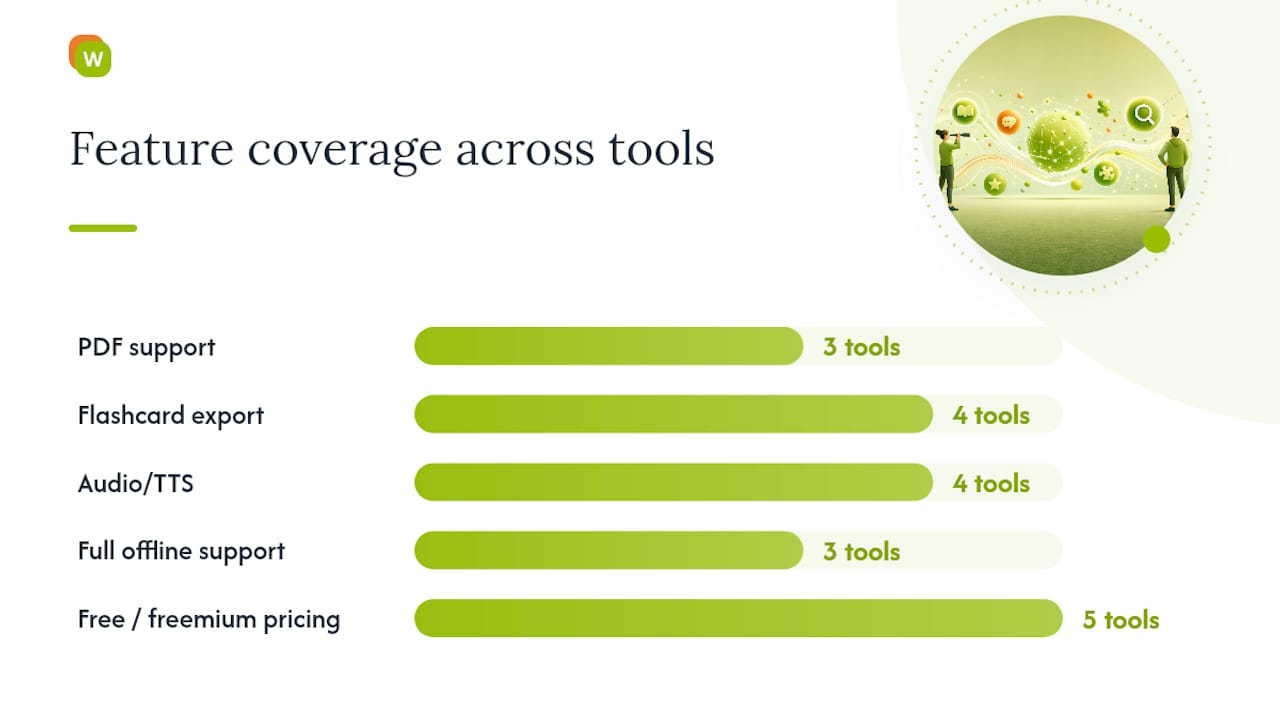
| Tool | Best For | Browser/Platform | PDF/YouTube Support | Flashcard Export | Audio | Offline | Pricing |
|---|---|---|---|---|---|---|---|
| WordByWord | Reading-to-review workflow across 50+ languages | Chrome extension + web app | Yes, both PDF and YouTube subtitles | Anki, Quizlet, CSV | Voiceover on flashcards | Limited on free plan | Free; Premium $5.99/month |
| Zhongwen Chinese-English Dictionary | Fast Chinese hover lookups | Chrome, Firefox | No | No | No | Yes | Free |
| Pleco | Deep Chinese dictionary data | Primarily mobile (iOS/Android) | No | Limited | Yes | Yes | Free with paid add-ons |
| Zhongzhong | Minimal single-word lookups | Chrome | No | No | No | Yes | Free |
| Migaku | Sentence mining for character languages | Chrome extension | Yes, subtitle support | Anki | Yes | Limited | Subscription |
| Definer / Dictionariez | Custom multi-source lookup pipelines | Chrome, Firefox | PDF support | Anki export | TTS supported | Varies by source | Free/open source |
A few trade-offs matter more than the table shows. Privacy-conscious extensions like Quick Define market themselves specifically on minimal permissions and no tracking, which is worth checking against any tool that requests broad page access. Offline capability varies a lot: Yomitan’s Chrome listing reports over 60,000 users and full offline mode with AnkiConnect export, which shows there’s real demand for tools that work without a live connection. For Chinese specifically, character decomposition and pinyin display separate the specialist tools (Pleco, Zhongwen) from generalist ones that treat Chinese like any other language pair.
PDF support is the dividing line for a lot of learners. Reading a novel or a textbook chapter as a PDF is common, but many popup dictionaries, including several Chinese-specific ones, only work on live web pages. That single gap rules out entire categories of study material for anyone who reads scanned textbooks or downloaded articles.
How Do You Choose the Right Popup Dictionary?
Run through this checklist before you commit to one tool for the long haul:
- Activation speed. Does it define on hover, click, or a keyboard shortcut? Hover lookups feel faster but can misfire on dense text; click-based tools are more deliberate.
- Content coverage. Test it on a normal web page, then a PDF, then a YouTube video with subtitles. Many tools only cover the first case.
- Retention features. Can you save a word and export it to Anki or another spaced-repetition system, or does the definition just disappear when you close the tab?
- Pronunciation and audio. For Chinese, this means pinyin and spoken audio, not just characters and a gloss.
- Privacy and offline access. Check what permissions the extension requests and whether it works without an internet connection.
- Language-specific depth. For Chinese, look for character decomposition and radical breakdowns, not just word-level translation.
To actually test one, install it, then try it on three things in one sitting: a normal article, a PDF, and a YouTube video with subtitles turned on. Save one word from each and check whether it exports cleanly to a flashcard system. That fifteen-minute test tells you more than any feature list.
Pro Tip: Look up a word, save it, then set a reminder to review it in exactly seven days without looking at the source text. If you still recognize it cold, the tool’s review system is doing its job. If you’ve forgotten it, the lookup alone wasn’t enough.
How Does WordByWord Turn Lookups Into Retained Vocabulary?
Most popup dictionaries stop at the definition. WordByWord treats that as step one. The extension and web app work together across more than 50 languages, so the same lookup habit carries over whether you’re reading in Chinese, Spanish, or Japanese.
Here’s what the workflow actually looks like in practice:
- Click an unknown word on a website, in a PDF, or inside a YouTube subtitle, and it’s translated instantly.
- Spotlight mode highlights that word directly on the page based on how well you know it, so review targets stay visible without extra effort.
- Comprehension level tells you upfront what share of a given text you already understand, useful for picking reading material that actually matches your level.
- Saved words go into collections you build manually, generate with AI, or import from Anki, Quizlet, or a spreadsheet.
- Review runs through seven modes, including typing, listening, and sentence building, scheduled by spaced repetition.
A free plan is available indefinitely with usage limits, allowing users to test the workflow before considering an upgraded version.
When Are Popup Dictionaries Enough, and When Should You Pause?
Popup lookups shine during extensive reading and streaming: you’re moving fast, and a quick definition keeps you in the flow. They fall short with dense grammar or word families, where a two-second popup can’t explain why a character carries three different meanings depending on context.
A workable session looks like this: read an article with lookups on, save anything unfamiliar, then spend ten to fifteen minutes afterward running those saved words through a review session. The reading builds exposure. The review is what makes it stick.
— WordByWord Team
Try WordByWord: What the Free Plan Gets You
WordByWord’s Free Forever plan costs nothing and stays free indefinitely, with usage limits that ease once you’re ready for Premium at $5.99 a month.
Getting started takes about three minutes. Install the Chrome extension, then try it three ways: click an unfamiliar word on any news article, open a PDF and do the same, then turn on subtitles on a YouTube video and click a word mid-sentence. Each lookup gets saved automatically, and Spotlight mode will already be marking what you know and don’t. When the free plan’s limits start to feel tight, an upgraded plan removes usage limits and unlocks additional features such as unlimited collections and review sessions. Head to the WordByWord landing page to install the extension and start your first collection today.
Primary Sources Used for Feature Checks
- Cambridge Dictionary for definitions and pronunciation audio.
- Wiktionary for community-sourced entries.
Sources
- Cambridge Dictionary | English Dictionary, Translations & Thesaurus
- Quick Define — Popup Dictionary – Get this Extension for 🦊 Firefox (en-US)
FAQ
What Are the Top Popup Dictionaries for Language Learners?
WordByWord, Zhongwen Chinese-English Dictionary, and Pleco cover the three most common needs: retention-focused review, fast Chinese hover lookups, and deep dictionary data. WordByWord stands out for combining lookups on websites, PDFs, and YouTube with built-in spaced-repetition review.
Is Pleco Better Than Other Chinese Dictionary Tools?
Pleco offers more lexical depth than most browser-based Chinese tools, including character decomposition, handwriting input, and spoken audio. It runs primarily on mobile, though, so learners who want in-browser popup lookups on web pages usually pair it with a tool like Zhongwen or WordByWord instead.
What Is the Best Overall Dictionary Tool?
There’s no single tool that wins on every axis, since a dictionary app and a popup extension solve different problems. For learners who want reading and vocabulary retention combined in one workflow, WordByWord is built specifically for that, with Spotlight mode and spaced repetition working across websites, PDFs, and YouTube subtitles.
Is Collins or Oxford Dictionary Better for Learners?
Both are solid general English references, and the better choice usually comes down to whether you prefer Collins’ example-heavy entries or Oxford’s more traditional definitions. Neither is built as a popup tool on its own, so learners typically pair one with a browser extension for in-page lookups.
Does WordByWord Support Chinese Specifically?
Yes. WordByWord covers Chinese among its 50-plus supported languages, letting you look up characters directly in web pages, PDFs, and YouTube subtitles and save them into review collections. For deep character-level study like stroke order or radical breakdowns, pairing it with a specialist tool like Pleco or Zhongwen fills that gap.