
What Comprehension Level Does
Comprehension Level answers one question: is this at my level? The extension takes all the text of a page, video or PDF, compares it with your own vocabulary, and shows the share of words you already know. You see the number before you commit an hour to the content — not after.
The score is personal. The same video can be an easy watch for you and far too hard for someone else, because it is measured against your saved words, not against an average difficulty label.
Turning It On
On YouTube the score is always visible — there is nothing to turn on.
For articles and PDFs, open the extension popup and switch on the Comprehension Level toggle next to Spotlight Mode. It requires you to be signed in and uses your current learning language.
The Chip on Pages and PDFs
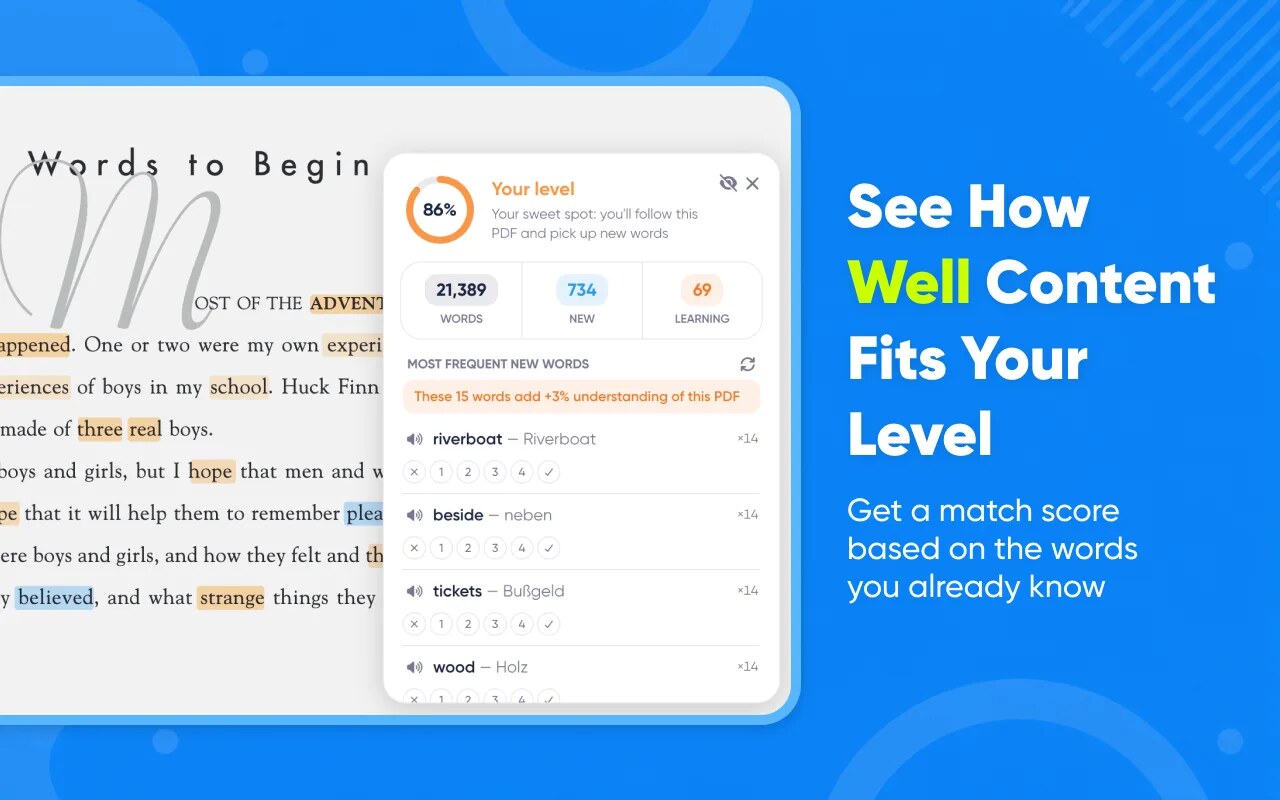
On a regular website or in a PDF, a small chip appears in the corner of the screen with the percentage. Expanded, it also shows the zone and how many new words the page contains:
88% · Your level · 34 new words
Click the chip to open the full panel. If the page has too little text to judge — fewer than 20 counted words — no score is shown: a percentage over a handful of words would be noise rather than data.
The Button on YouTube
The score appears right in the YouTube player's control bar, next to the WordByWord button. It is always shown when you are signed in — the popup toggle does not affect it. The tooltip reads Comprehension: 88% — click for details, and the number is calculated from the video's subtitles in the language you are learning.
If the video has no subtitles in that language, the extension says so directly — Can't rate this video: no subtitles in the language you're learning — instead of showing an invented number.
What the Panel Shows
- The percentage in a ring, coloured by zone
- Three counters: total words counted, unique new words, and words you are currently learning
- The zone with a hint written for what you opened — a video, an article or a PDF
- The most frequent new words with their occurrence counts
- A Spotlight icon right in the header, so you can turn highlighting on when something turns out to be harder than expected
What the Zones Mean
| Zone | Coverage | What it means |
|---|---|---|
| Easy | 95% and up | An easy watch or read — good for reinforcing what you know |
| Your level | 85–94% | The growth zone: you follow along and still meet new words |
| Challenging | 70–84% | Doable with effort — interactive subtitles and Spotlight will help |
| Too hard | below 70% | Save it for later, and start with the words in the list instead |
The thresholds come from research on lexical coverage, where comfortable unassisted reading starts at around 95% of known words. Our growth zone sits deliberately lower, because WordByWord gives you support the studies did not have: one-click translation, interactive subtitles and highlighting.
The Most Frequent New Words
Below the counters the panel lists the new words that appear most often, each with its frequency (×7), its translation, a pronunciation button and the usual level buttons. Above the list you will see a line like:
These 11 words add +6% understanding of this video
That is arithmetic, not a promise: if those words moved into your known column, the coverage percentage would rise by that much. Frequent words carry disproportionate weight, so a short list often moves a video from Challenging into Your level.
The list length is not fixed. It adapts to the text — between 5 and 15 words, enough to cover the bulk of the new occurrences. A dense article where four terms repeat constantly needs a shorter list than a documentary where new words are spread thin. Words with the same frequency are never split across the boundary.
Use the refresh button in the list header to rebuild the list after you have rated some words.
How the Percentage Is Calculated
Knowing what the number counts makes it trustworthy:
- Known means known. A word counts towards your coverage only from level Learned upwards. Words at New, Recognized or Familiar are reported separately as "learning" and do not inflate the percentage.
- Noise is excluded, difficulty is not. Anything Spotlight would not highlight is left out of the calculation entirely: your ignore list, text in another writing system, URLs, e-mail addresses, hashtags and tokens without letters.
- Small samples are skipped. Below 20 counted words there is no score.
- 100% never lies. 99.5% rounds down to 99. You only see 100% when coverage is genuinely complete.
- PDFs are scored progressively. Text is added page by page as you read, so a long document gives a running estimate instead of nothing.
Any Language You Learn
The score works in every language WordByWord supports — it compares content with your vocabulary, so learners of Spanish, Japanese or German get the same number for content in their own target language. See Supported Languages.
Related
- Spotlight Mode — highlighting known and unknown words on the page
- Learning with YouTube Subtitles — clicking subtitle words to translate and save them
- Reading and Translating PDFs — working inside documents