Yes, PDFs can build real vocabulary and reading skill, but only if you stop treating them as something to skim. A meta-analysis of 21 studies found that digital reading produces measurable vocabulary gains on both immediate and delayed tests, especially when the reading is active rather than passive. Pick one short block of a PDF, pull out 8 to 12 target words, and put them into a spaced review system before you move to the next page.
TL;DR:
- Active engagement with PDFs, such as highlighting unknown words and building spaced review flashcards, significantly improves vocabulary retention.
- Ensure PDFs are from reputable sources with clear authorship, publication date, and licensing to avoid low-quality or illegal content.
- Focus on small study blocks of one to two pages with deliberate extraction and review, as larger chunks hinder effective memorization.
- Use tools like OCR and browser extensions to efficiently extract text and create context-rich flashcards without manual copying.
- A structured, active study routine using PDFs with retrieval practice outperforms passive reading or mere surface skimming.
Table of Contents
- How Do You Learn a Language With PDFs Effectively?
- What Is the Best Step-by-Step Way to Study a PDF?
- Which Tools Help You Extract Text and Build Flashcards From PDFs?
- How Can WordByWord Make PDF Study Faster?
- Copyright and How to Check a PDF’s License Before You Study It
- Authoritative Repositories and Research Worth Bookmarking
- Our Take: What the Research Actually Justifies
- Turn Your PDF Highlights Into Words You Actually Remember
- Sources
- FAQ
How Do You Learn a Language With PDFs Effectively?
Finding a PDF is the easy part. Finding one worth your time is where most learners waste hours scrolling through scanned textbook pirate sites that turn out to be missing half their pages or riddled with garbled OCR text.
Start with sources that treat metadata as seriously as content. Open textbook libraries, university course pages, and public-domain archives almost always list who wrote the material, when it was published, and what license covers it. That transparency is not a formality. It is how you tell a usable resource from a dead end before you have invested an hour highlighting vocabulary in something you cannot legally keep.
Good places to look:
- Open textbook repositories, where course-length grammar and reading books come with clear licensing and level tags.
- University language department pages, which often post free supplementary PDFs tied to A1 through C1 course levels.
- Public-domain literature archives, useful once you are past intermediate and want real, unedited prose.
- Established language-teaching sites that publish downloadable worksheets or graded readers with an author’s name attached.
The Open Textbook Library’s own guidance is a useful model here: it recommends checking authorship, publication date, level, and license before you trust a document. Apply the same four checks to anything you download. If a PDF has no visible author, no date, and no license, and the text looks like it was scanned through a fax machine in 2004, skip it. A resource with holes in its formatting usually has holes in its accuracy too.
What Is the Best Step-by-Step Way to Study a PDF?
A PDF sitting open in a tab does nothing for your vocabulary. The gains come from what you do to it, not from staring at it. Here is the workflow that turns one page into a week of structured practice.
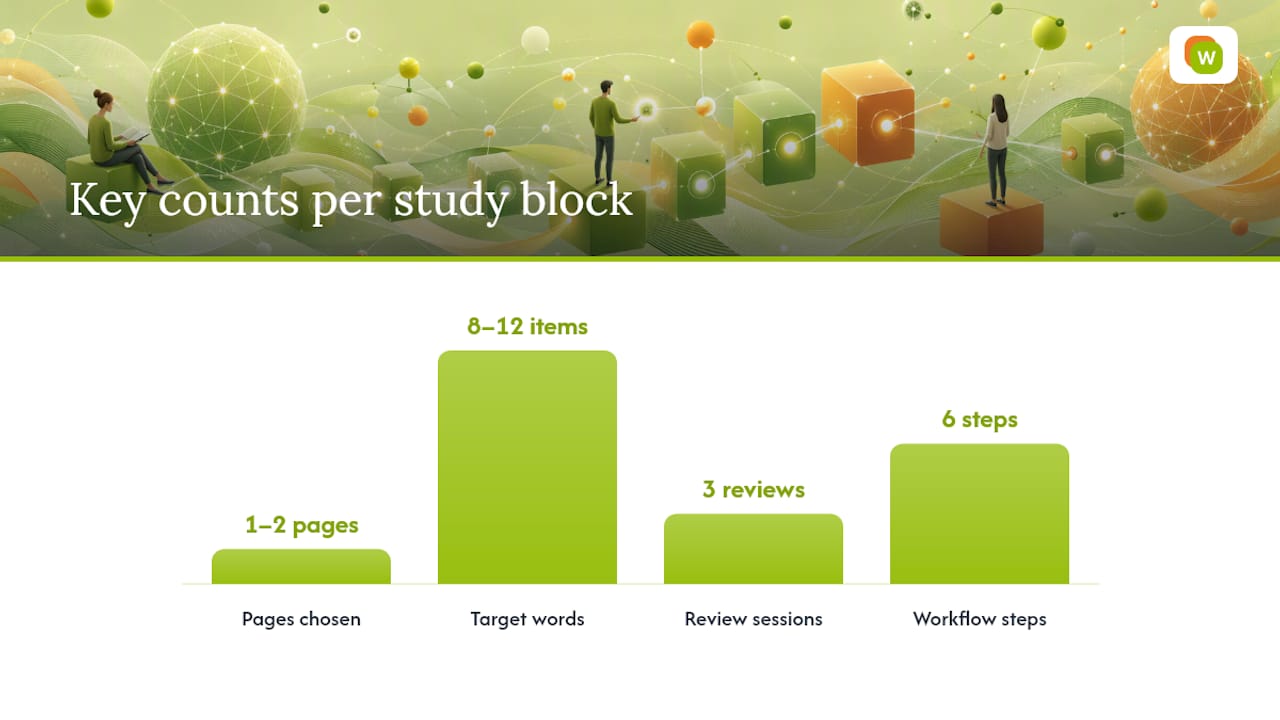
- Scope the block. Pick one to two pages and set a single goal: either general comprehension or a specific vocabulary set. Trying to do both at once usually means you do neither well.
- Read actively. Underline or highlight unknown words as you go, jot the sentence they appeared in, and flag any phrase you would stumble over saying out loud.
- Extract deliberately. Choose 8 to 12 items from what you flagged, not all of them. Build a flashcard for each one that keeps the original sentence as context, plus audio if you can get it.
- Schedule retrieval. Review the new cards the same day, again at 24 to 48 hours, then again around day seven. Alternate written recognition with saying the word aloud so you are training both channels.
- Verify. After a week, quiz yourself cold on the 8 to 12 words and write a two or three sentence summary of the original passage from memory.
That 8 to 12 range is not arbitrary. Pedagogical guidance built on the same digital reading research points to small, bounded study units as the way to avoid dumping fifty unreviewed words into a pile you will never open again. A page range keeps the task finishable in one sitting, which matters more for consistency than any single technique does.
Pro Tip: Pair every new word with a spoken repetition, not just a written flashcard. Vocabulary that only exists on a screen tends to freeze up the moment you need it in conversation.
Which Tools Help You Extract Text and Build Flashcards From PDFs?
Before you build a single flashcard, copy one paragraph from the PDF and paste it into a plain text document. If the words come out clean, you have a text layer and extraction will be simple. If you get a wall of scrambled symbols or nothing at all, you are dealing with a scanned image, and you will need OCR (optical character recognition) before anything else works.
Three extraction methods cover almost every situation:
- Manual copy and paste, fine for text-layer PDFs, followed by a quick read-through to catch stray errors.
- OCR plus verification, necessary for scanned pages, always followed by spot-checking a handful of extracted lines against the original image.
- Selective screenshot and OCR, useful for stubborn layouts like textbook sidebars or vocabulary boxes that regular OCR tends to mangle.
Workflow-wise, you are choosing between manual entry into something like Anki or a spreadsheet, semi-automated PDF-to-deck generators, or a browser-integrated tool that captures words in context as you read. Each has a different time cost versus control tradeoff.
Two-column academic layouts are the most common source of extraction errors, since OCR engines often read straight across both columns and scramble the sentence order. Missing diacritics and dropped line breaks are the next most frequent problems, particularly in Central European and Vietnamese texts. A practitioner note on digital reading extraction recommends testing a sample paragraph before mass-producing cards from a whole chapter, which saves you from discovering the errors after you have already memorized them wrong.
A couple of practical guardrails: never upload sensitive personal documents to a free online OCR tool, and if a PDF is a full 300-page book, split it into chapter-sized files first. Most extraction tools choke on anything over a few hundred pages, and a smaller file is easier to scope into the study blocks described above.
How Can WordByWord Make PDF Study Faster?
A browser extension solves the exact friction point in the workflow above: the gap between spotting a word and actually saving it somewhere you will review it. WordByWord works inside PDFs the same way it works on any webpage or YouTube video, letting you translate a word with one click without leaving the document or copying it into a separate app.
Two features matter specifically for PDF study. Comprehension level tells you what percentage of the words in that PDF you already know before you commit to reading it, which answers the leveling question that open textbook metadata only partially solves.
Try this: open a two-page section of any PDF, capture 8 to 12 words directly into a vocabulary collection, and run one week of scheduled reviews through the built-in spaced repetition flashcards. Because the capture happens in context, you skip the copy, paste, and reformat steps that eat most of the time in a manual workflow, and you keep the original sentence attached to every card automatically.
Copyright and How to Check a PDF’s License Before You Study It
Not every PDF you find is legal to download, and “it’s on the internet” is not a license. Copyright protection applies to language textbooks and workbooks the same way it applies to novels and films, and a scanned copy of a commercial textbook posted without permission is an infringement no matter how helpful it looks.
The fix is checking the same metadata fields recommended for evaluating quality. Open textbook repositories list the license type directly, usually a Creative Commons variant, along with attribution requirements. Creative Commons licenses range from CC BY, which mainly requires crediting the author, to more restrictive versions that block commercial use or derivative works. Read the specific license attached to a specific file rather than assuming all “free” PDFs share the same terms.
A few practical rules keep you safe:
- Download only from sites that state a license or explicitly mark material as public domain.
- Keep the license and attribution information saved alongside the file, not just in your browser history.
- Treat university course pages carefully. Some post materials for enrolled students only, even though the file is technically reachable by anyone with the link.
- Avoid file-sharing forums and unattributed scan collections entirely. If a page will not tell you who wrote the document, it will not tell you whether you are allowed to have it either.
Authoritative Repositories and Research Worth Bookmarking
A short list of places to verify claims and find more material:
- Open Textbook Library FAQ, the clearest public explanation of how licensing and metadata work for downloadable academic texts.
- Second and foreign language vocabulary learning through digital reading: a meta-analysis, the study behind this article’s claims about digital reading and vocabulary retention.
- Empowering Asynchronous Arabic Language Learning Through PDF Hyperlink Media, research showing that PDFs built as hyperlinked, interactive media outperform static ones.
Each of these is worth returning to whenever you are unsure whether a resource, or a study habit, actually holds up.
Our Take: What the Research Actually Justifies
The conventional advice on PDF study is “read more,” and that advice is close to useless. The meta-analysis behind this article is explicit that effects were moderated by how the reading was structured. Passive scrolling through a scanned chapter barely moves the needle. Active tasks with glosses, annotation, or a review system attached do.
What gets underrated is the discipline of scoping. Learners fixate on finding the “right” PDF and skip the much more important step of deciding how much of it to study at once. A ten-page chapter treated as one giant vocabulary dump produces worse recall than a single well-worked page.
If you take one thing from this article, prioritize the extraction and review habit over the source. A mediocre PDF studied with retrieval practice will teach you more than a perfect one read passively once and forgotten. Fix your workflow first. Worry about finding the ideal document second.
— WordByWord Team
Turn Your PDF Highlights Into Words You Actually Remember
Most PDF study advice stops at “highlight the unknown words,” and leaves you to build flashcards by hand afterward. WordByWord skips that gap entirely: it translates words inside any PDF with one click, saves them straight into a collection with the original sentence intact, and schedules them for spaced review automatically.
That matters most for learners who read a lot of PDFs but rarely finish reviewing what they highlighted. Spotlight mode shows you at a glance which words in a document are still unknown, and comprehension level tells you whether a given PDF actually matches your level before you commit an evening to it. Seven flashcard training modes, including typing and listening drills, cover the retrieval practice this article recommends without any separate app or manual card-building. The Free Forever plan works indefinitely with usage limits, and Premium at $5.99 per month removes them if you are working through PDFs regularly. Install the Chrome extension and open your next study PDF to see your comprehension level before you read a single line.
Sources
- Second and foreign language vocabulary learning through digital reading: a meta-analysis
- Open Textbook Library FAQ
FAQ
Can You Actually Learn a Language From PDFs Alone?
PDFs work best as source material inside an active study routine, not as a stand-alone method. Research on digital reading and vocabulary gains found the strongest results came from active tasks like glossing and review, not passive reading, so pair any PDF with extraction and spaced repetition rather than reading it cover to cover.
Is There a Good Free PDF for Learning English?
Open textbook libraries and university language department pages regularly publish free, leveled English reading and grammar PDFs with clear authorship and licensing. Check the Open Textbook Library first, since it lists level, license, and publication details for every title.
How Does the FBI Train Agents to Learn Languages So Fast?
Intensive government language training relies on immersive, structured daily practice across reading, listening, and speaking, often for six or more hours a day over months, rather than any single trick. The core principle that transfers to independent PDF study is the same one this article covers: active practice with frequent retrieval beats passive exposure.
What Is the Easiest Language for an English Speaker to Learn?
Languages closely related to English in vocabulary and grammar, such as Spanish, Dutch, and Norwegian, are generally considered the fastest to reach conversational ability. Ease still depends heavily on your prior language background and how consistently you practice, so treat any “easiest language” ranking as a rough guide rather than a guarantee.
Is 40 Too Old to Start Learning a New Language?
No age threshold prevents adults from learning a new language to a high level. Adult learners often progress faster than children in early vocabulary and grammar because they can use structured techniques like scoped PDF study blocks and spaced repetition, which children typically cannot apply on their own.