The fastest way to translate a YouTube Short is to turn on captions in the player, hit auto-translate or copy the transcript line, then capture just one phrase for spaced-repetition review instead of trying to absorb the whole clip. A tool like WordByWord folds subtitle lookup and saving into one click. The whole loop, from watching to saving a flashcard, takes less than five minutes if you stick to one phrase per Short.
TL;DR:
Limiting your focus to one phrase per Short and repeating the process ensures efficient vocabulary extraction within five minutes.
Using transcripts and slowing playback speed improves accuracy when capturing and translating spoken phrases.
Target-language subtitles and immediate repetition significantly enhance vocabulary acquisition compared to single-viewing.
Save only enough context with timestamps, original lines, translations, and personal sentences to facilitate effective spaced-repetition reviews.
Overconsumption of short videos can impair memory and attention, so set strict limits and prioritize purposeful study over passive scrolling.
Table of Contents
How Do You Translate YouTube Shorts Step by Step?
You don’t need to watch a Short more than twice to get something usable out of it. The trick is limiting your ambition: one Short, one phrase, one output. Here’s the routine.
-
Pick up to three Shorts on a topic or channel you’re already interested in, and confirm each one has captions before you commit time to it.
-
Watch once for general meaning. Don’t pause. Just get the gist.
-
Replay and isolate one phrase or chunk that sounded useful, unfamiliar, or repeated more than once.
-
Translate or look up that phrase, then rewrite it into a sentence about your own life or day. Save both the original and your version.
-
Set a short review window (same day, plus a spaced check two or three days later), then stop. Don’t scroll into a fourth clip “just to be sure.”
That fifth step matters more than people think. Short-form platforms are built to keep you swiping, and every extra clip you watch without capturing anything dilutes the session.
Pro Tip: Cap yourself at three Shorts before you open your study app. If you haven’t found one worth capturing by clip three, the topic or channel isn’t a match for your level today, not a personal failure.
How Do You View and Translate Captions in the Browser?
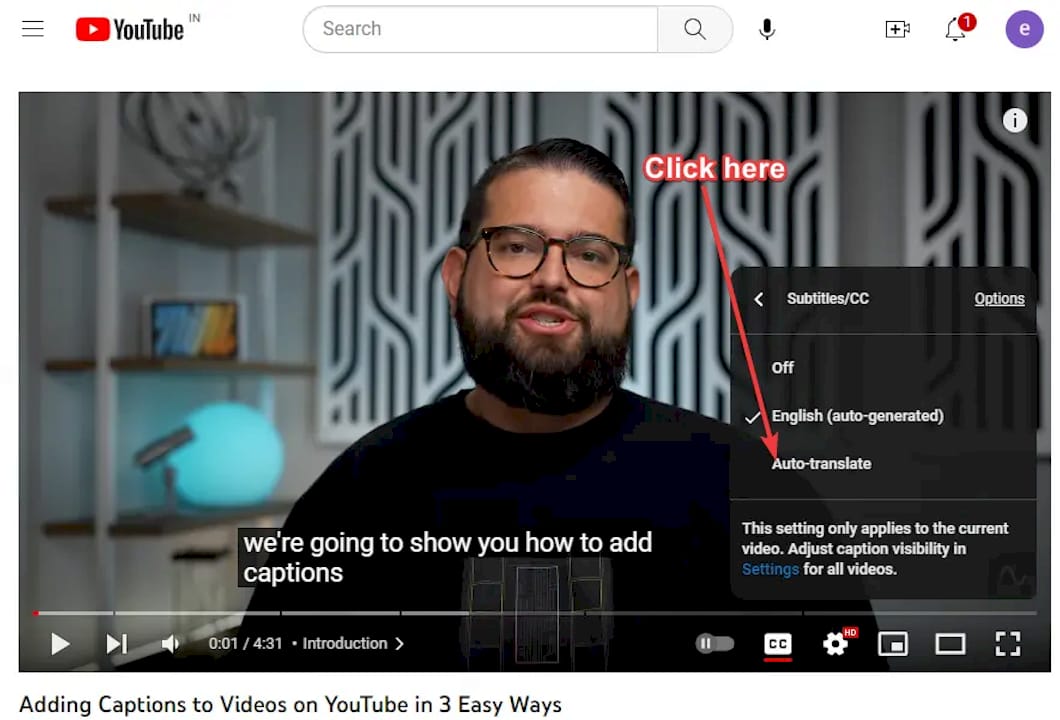
Most of the actual translation work happens in the caption settings, not in a separate app. On desktop, open the Short, click the settings gear on the player, and turn on subtitles/CC. From there, most viewers can select “Auto translate” and pick a target language, though this only works when the video already has captions (auto-generated or creator-uploaded) to translate from.
Auto-translate is convenient but rough. It renders one line at a time and disappears fast, which makes it a poor tool for actually capturing a phrase. Transcripts are more stable. Open the video description or the “…” menu, select “Show transcript,” and you get a scrollable, timestamped list of every line. Copying a line straight from the transcript panel preserves the exact wording and lets you note the timestamp so you can jump back to that moment later.
A few practical habits make this smoother:
-
Drop playback speed to 0.75x for a first pass if the speaker talks fast.
-
Loop the same five seconds two or three times before deciding a phrase is worth saving.
-
Copy the transcript line rather than retyping from memory. Fast speech and mumbled words get misheard easily.
-
On mobile, where transcript access is limited, a transcript extraction tool can pull captions when the app doesn’t expose them directly.
A browser extension that overlays translations directly on the caption line skips the copy-paste step entirely, which matters once you’re doing this daily rather than as a one-off.
What Study Tactics Actually Work for Short-Form Video?
Not every Short is worth your attention, and treating them all equally is the most common mistake self-directed learners make. A meta-analysis of captioning and subtitling research found large positive effects on vocabulary acquisition from subtitled viewing, with intralingual captions (subtitles in the language you’re learning, not your native one) among the most effective formats. That’s a strong argument for choosing target-language captions over translated ones whenever you can follow along.
Repetition compounds that effect. A ReCALL study on dual-subtitled video found that watching a clip with both native and target-language subtitles, then immediately repeating the viewing, produced greater vocabulary gains than a single pass. Immediate replay beats waiting.
But short-form video has a ceiling. Research in Communications Psychology found short videos can reduce neural synchrony in memory-related brain regions and lower immediate memory accuracy compared to longer content. Fragmented, fast-paced clips are simply harder to hold onto.
Before you commit to studying a clip, run this check:
-
Does it have clean, readable captions (not just auto-generated fragments)?
-
Is the speaker’s pace slow enough to follow at 1x, or will you need to slow it down?
-
Is there a visual or narrative thread, not just quick cuts with no context?
Learners themselves rate subtitles, visuals, and narrative as the strongest combination for noticing new vocabulary, and pacing is what makes or breaks whether a clip is usable at all. If a 60-second Short feels like three disconnected scenes, a slightly longer video with a clearer story often teaches you more per minute.
What Should You Save From a Short, and How Do You Review It?
A saved item is only useful if it gives you enough context to recall the moment later without rewatching the whole video. Keep the format tight.
-
Timestamp — where in the Short the phrase appeared, so you can jump straight back if the meaning fades.
-
Original line, copied exactly from the caption or transcript, not retyped from memory.
-
One concise translation, not a paragraph of alternate meanings.
-
A personal example sentence using the phrase in a context from your own life.
-
A link back to the source video, which reinstates the visual and audio context during review, something a flashcard with text alone can’t do.
Once you have a handful of these, get them into a spaced-repetition system rather than letting them sit in a notes app. Export a CSV and import it into Anki or Quizlet, or use a collection feature built to hold saved phrases directly.
For the drills themselves, mix formats rather than running the same flashcard type every time. Typing the phrase from memory, rebuilding it from scattered letters, and listening drills without the text visible all test recall differently, and rotating between them keeps review from turning into rote pattern matching.
Why Do Short Translations Sometimes Go Wrong?
Auto-captions and auto-translate are convenient but imperfect. Names, slang, and heavily reduced or slurred speech (the “gonna,” “wanna,” “kinda” of casual talk) get mangled often. Background music or overlapping voices make things worse.
If a Short relies on fast, dense speech with no visual support, it’s probably not worth the time. Treat these as red flags:
-
The auto-caption text reads as gibberish for more than a few seconds at a stretch.
-
Music or sound effects drown out the dialogue.
-
The clip cuts between three or more scenes with no clear thread.
When in doubt, verify against the full transcript rather than trusting the floating caption line, or just pick a different clip. Some Shorts are only good for noticing a phrase exists, not for extracting a clean example sentence, and that’s a fine outcome too.
How WordByWord Handles the Whole Workflow for You
WordByWord builds the routine above directly into the browsing you’re already doing, rather than asking you to switch between a video app and a separate study app.
-
Spotlight mode highlights unknown words right inside the subtitle text as you watch, color-coded by how well you already know them, so you’re not scanning a wall of captions trying to guess what’s new.
-
Comprehension level tells you what percentage of a video’s vocabulary you already know before you commit to it, which solves the clip-selection problem from earlier in this guide.
-
Collections hold everything you save, whether you build them by hand, generate them with AI from a prompt, or import existing decks from Anki, Quizlet, or a CSV file.
-
Seven training modes, including typing, sentence builder, and listening drills, turn saved phrases into scheduled spaced-repetition review instead of a list you forget about.
The dual subtitles guide and the three fast methods for translating YouTube subtitles on WordByWord’s blog walk through setup in more detail if you want the mechanics before diving in.
Pro Tip: Check the Comprehension level score before you start a Shorts session. A clip sitting at 85 to 90 percent known vocabulary is usually the sweet spot: familiar enough to follow, new enough to be worth capturing something from.
A Short, Honest Take on Learning From Shorts
Short-form video is not a shortcut to fluency, and treating it like one sets you up to feel busy without getting anywhere. What works is small and boring: pick a couple of clips, catch one phrase, turn it into a sentence, review it a few days later. Repeat tomorrow.
The bigger risk isn’t bad translation. It’s the scroll. Research links heavy short-video consumption to reduced attention control, and that same pull that keeps you swiping for “one more clip” is exactly what turns a five-minute study session into forty minutes of passive watching with nothing saved. Set the limit before you start, not after.
Three things to do before your next session: pick three Shorts, decide in advance you’ll capture exactly one phrase from each, and open your review app before you open YouTube.
— WordByWord Team
Turn Every Short Into Vocabulary You Actually Keep
Everything in this guide, checking captions, isolating a phrase, saving it with context, and reviewing it on a schedule, is what WordByWord does automatically the moment you install it. Instead of juggling a transcript tab, a translation tab, and a flashcard app, you get subtitle lookup, one-click saving, and spaced-repetition training in a single extension that works while you browse.
Spotlight mode shows you which words in a Short’s captions are worth stopping for, Comprehension level tells you if a clip matches your current vocabulary before you commit five minutes to it, and your saved phrases land straight into a collection ready for typing, listening, and sentence-builder drills. If you’re studying more than one language, every feature tracks separately, so switching between them never means starting over.
Set up your free account on WordByWord and translate your next Short before you finish this sentence.
Sources
-
UCL discovery — meta-analysis on captioning/subtitling effectiveness
-
Communications Psychology — Short-form video effects on memory (2026)
-
Learner perceptions of TikTok features for vocabulary learning (FLS, 2025)