
YouTube works as immersion only when you stop watching passively and pair every video with a short, repeatable output routine. Pick one captioned native-language clip right now, replay one sentence, and say it out loud. That single move, done consistently, does more for fluency than hours of scrolling. WordByWord can help you translate the subtitles and save that sentence for later review, but the habit itself is what makes the language stick.
TL;DR:
- Limiting your YouTube viewing to curated target-language playlists and unsubscribing from unrelated channels significantly reduces distractions and native-language content.
- Active output, including repeating, shadowing, and creating sentences from transcripts, is essential for progressing beyond passive listening.
- Focusing on short, structured sessions of 5 to 15 minutes daily with consistent phrase extraction and review accelerates vocabulary retention and speaking fluency.
- Prioritizing content types such as vlogs or native interviews over short clips or music ensures exposure to real, practical language use.
- Using specialized tools like dual-subtitle apps and transcription extractors streamlines vocabulary building and minimizes switching between different learning resources.
Table of Contents
- How Do You Set Up YouTube for Language Immersion?
- What Is the YouTube Active Output System?
- Which YouTube Content Actually Builds Fluency?
- Which Tools Make YouTube Immersion Easier?
- What Daily and Weekly Routines Build Vocabulary Fast?
- How Do You Know if YouTube Immersion Is Working?
- How We Think About Fitting This Into Real Life
- Try WordByWord for Your Next YouTube Session
- Sources
- FAQ
How Do You Set Up YouTube for Language Immersion?
Your YouTube homepage is not built for learners. It’s built to keep you watching whatever keeps you watching, which is a different goal entirely. Before you study anything, spend fifteen minutes turning the platform into a resource library instead of an algorithmic feed.
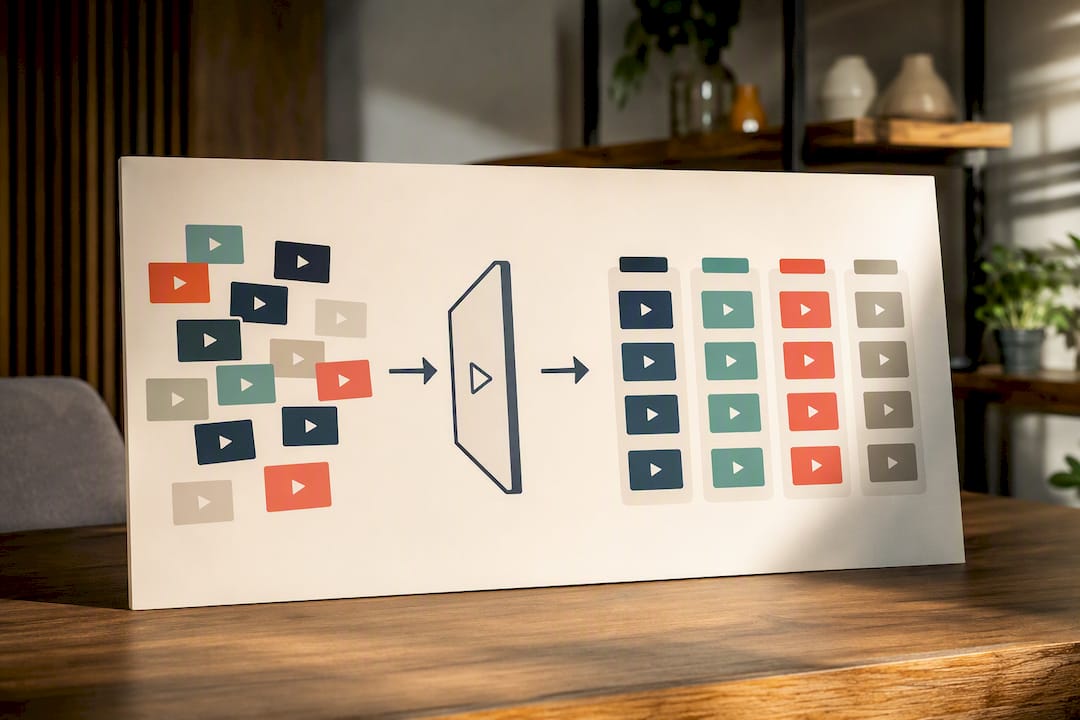
Start with your account settings. Switching your interface language to your target language forces small, constant exposure (menus, notifications, button labels) that adds up over weeks without any extra effort. Then build a dedicated playlist or even a second channel just for target-language content, separate from your regular viewing. Mixing immersion clips into your everyday feed guarantees they get buried.
Recommendation training matters more than most learners realize. YouTube’s algorithm can pull you into what researchers have called a “recommendation rabbit hole,” where one language video leads to five unrelated ones in your native tongue within minutes, according to a Kenyon College analysis of algorithmic recommendation limits. Treat the platform like a curated shelf, not a stream, by taking these steps:
- Subscribe only to channels you actually plan to study from, not ones you casually clicked once.
- Clear watch history entries that don’t match your learning goals so the algorithm stops anchoring on them.
- Use “Not Interested” aggressively on anything that pulls you back toward native-language content.
- Enable captions and open the full transcript panel before you start watching.
- Slow playback to 0.75x for early-stage listening, then work back up to full speed.
Before you commit to a video, check three things: captions actually exist and look accurate, audio is clear enough to make out individual words, and the clip runs short enough (under 8 minutes, ideally) to rewatch twice without losing patience.
What Is the YouTube Active Output System?
Watching a video twice doesn’t teach you to speak. Producing language does, according to research on the acquisition process, which points to output, not exposure, as the step most self-taught learners skip entirely. The fix is a timed, repeatable sequence you run on every clip:
- Pick (1 to 2 minutes). Choose a clip inside your target-language playlist that matches your level.
- Verify (1 to 2 minutes). Confirm captions are accurate, not garbled auto-generated text.
- Watch for gist (1 to 2 minutes). Play the clip once through without pausing, just to get the shape of it.
- Replay and isolate (2 to 5 minutes). Rewatch, pause on one sentence or phrase that stands out, and read the transcript line closely.
- Shadow and produce (2 to 5 minutes). Say the isolated sentence aloud, record yourself if you can, then build a new sentence using the same structure but your own content.
- Save (1 to 2 minutes). Log the phrase, the timestamp, and your personal sentence somewhere you’ll actually review it.
This is close to the method described as an active output system for YouTube learning, and the structure scales with your level. Beginners should lean on dual subtitles through steps 3 and 4, seeing native and translated text side by side. Intermediate learners should strip support earlier, going native-caption-only by step 4 and native-audio-only by step 5.
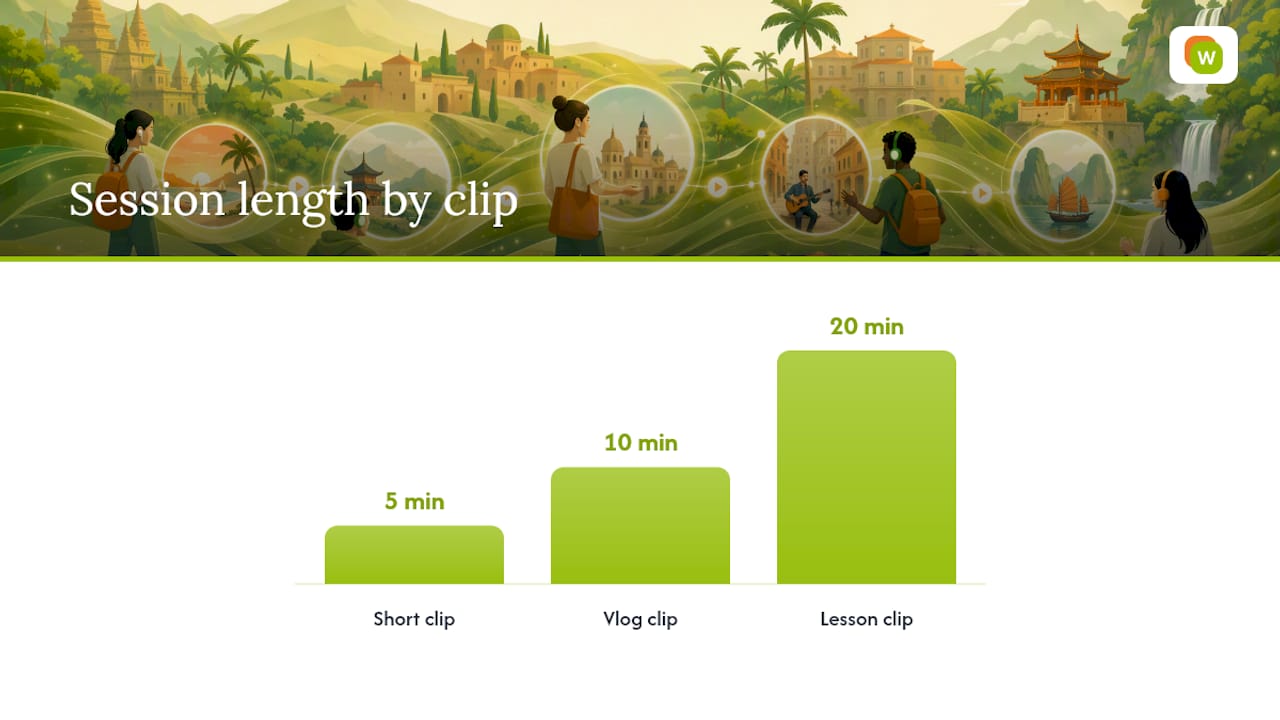
Pro Tip: Run the exact same six steps on a 5-minute Short, a 10-minute vlog clip, and a 20-minute lesson video. The timing scales down proportionally, but never skip step 5. A session without spoken output is just watching with extra steps.
Which YouTube Content Actually Builds Fluency?
Not every video trains the same skill, and treating them all interchangeably wastes your time. Match the format to what you’re actually trying to build, based on comparative guidance on choosing content types on YouTube:
- Structured lessons teach grammar rules and core vocabulary in a controlled, explained way, ideal when you’re still shaky on fundamentals.
- Vlogs expose you to real, unscripted colloquial speech, filler words, slang, and the pace natives actually talk at.
- News broadcasts train formal register and faster, cleaner input since anchors enunciate more than casual speakers.
- TV clips and interviews give you context-rich scenes where tone, gesture, and situation help you guess meaning.
- Music builds rhythm, pronunciation, and stress patterns, and repeated listens naturally reinforce vocabulary through melody.
- Shorts deliver high-frequency phrases in tiny doses, good for warm-ups but too thin to carry a full session alone.
Check difficulty fast before committing: watch the first 30 seconds without subtitles. If you catch the general topic, the clip is workable. If you’re lost within a sentence, drop down a level or switch formats.
The strongest long-term strategy is following two to four creators consistently rather than sampling widely. Repeated exposure to the same voice, accent, and vocabulary range compounds faster than novelty does, and it’s the same logic behind curated playlists over algorithmic browsing, as Fluent in 3 Months notes when recommending deliberate content choices over passive scrolling.
Which Tools Make YouTube Immersion Easier?
Five tool categories cover almost everything you need for this workflow, and each solves a specific friction point:
- Dual-subtitle tools show native and translated captions simultaneously, cutting the need to pause and look up words mid-sentence.
- Subtitle translators convert on-screen captions in real time, useful when no dual-subtitle option exists for your language pair.
- Transcript extractors pull the full text of a video so you can scan it before or after watching, rather than pausing constantly.
- Playback controllers let you slow, loop, or step through specific seconds, which matters more than people expect for shadowing practice.
- Vocabulary savers capture phrases directly from captions and push them into spaced repetition, closing the loop between watching and reviewing.
Each category has a real limit worth knowing. Auto-generated captions frequently misrender words or drop punctuation entirely, so Fluent in 3 Months cautions learners to prefer creator-uploaded captions when accuracy matters. Running several extensions at once can also slow your browser and, depending on the tool, raise privacy questions about what data gets read from the page.
WordByWord covers most of these categories from a single Chrome extension and companion web app. It translates unfamiliar words directly inside YouTube subtitles, shows dual subtitles so you’re never fully without support, and uses spotlight mode to highlight words on-screen by how well you already know them, from unknown to mastered. Anything you tap gets saved into a collection, and those collections turn into flashcards with spaced repetition built in, according to guidance on dual-subtitle workflows for extracting vocabulary, which found that tools showing dual subtitles or exporting transcripts make vocabulary extraction meaningfully faster.
Before installing multiple extensions, check that none of them overlap in function, confirm each one’s permissions request only what it needs, and disable ones you’re not actively using that week.
What Daily and Weekly Routines Build Vocabulary Fast?
A single video, worked properly, yields a moderate number of usable phrases. The routine that gets you there doesn’t need to be long. It needs to repeat.
- Daily micro-session (5 to 15 minutes). Run one full Active Output System cycle on one clip. Don’t try to cover multiple videos in one sitting.
- Extract cleanly. For each phrase you isolate, capture four fields: the phrase itself, the surrounding context sentence, the timestamp, and your own personal sentence using the same structure.
- Weekly cadence. Three focused sessions on new content, one dedicated review session revisiting saved phrases, and one attempt to use at least three saved phrases in real conversation or writing.
- Adjust by content type. A song session should prioritize rhythm and repetition over exhaustive vocabulary capture, since lyrics often bend grammar. A vlog session should prioritize colloquial phrasing you can drop into casual speech.
- Adjust by level. Beginners should cap extraction at 10 phrases per video to avoid overload. Intermediate learners can push toward 20, since faster pattern recognition means less time per phrase.
Pro Tip: Timestamp every phrase you save. Six weeks later, jumping back to the exact second of the original video re-anchors the memory far better than a flashcard sitting alone with no context.
For a full walkthrough of the extraction step, see this guide on turning YouTube captions into vocabulary in a single short session.
How Do You Know if YouTube Immersion Is Working?
Track output, not hours watched. Hours watched tell you almost nothing about whether you can speak.
- Reproduction rate: What percentage of saved phrases can you say correctly from memory a week later, without looking?
- Review volume: How many saved phrases have you actually revisited, not just filed away?
- Weekly recordings: Record yourself speaking for 60 seconds once a week and rate your own fluency against last week’s clip.
- Comprehension checks: Rewatch an old clip without subtitles and see how much more you catch compared to the first viewing.
- Timed shadowing accuracy: Shadow a 15-second clip and measure how closely your timing and pronunciation match the original.
Use your flashcard review streaks and stats as motivation, but don’t mistake a growing collection for growing fluency. A phrase saved but never spoken is a phrase you haven’t actually learned yet.
How We Think About Fitting This Into Real Life
Nobody sustains a language habit by overhauling their schedule. The realistic version of YouTube language immersion lives inside browsing you’re already doing, one clip and one sentence at a time. If you record yourself shadowing, keep it unlisted unless you genuinely want feedback. Consistency beats intensity here: five honest minutes daily outperforms one heroic hour on a Sunday you’ll skip next week. Prioritize saying the sentence over watching one more video.
— WordByWord Team
Try WordByWord for Your Next YouTube Session
This tool supports the workflow this article describes: translate a word mid-video, save it, and turn it into a flashcard without leaving the tab. It handles subtitle translation and dual subtitles directly inside YouTube, so the “verify captions” and “isolate a phrase” steps of the Active Output System happen in one click instead of three separate tools.
Every phrase saved lands in a collection, and a mode highlights on-screen which words are known versus which ones need work, to help judge a video’s difficulty before committing time to it. The Free Forever plan covers the core translation and flashcard features with no time limit, and Premium at $5.99 per month removes usage caps for learners running multiple sessions a day. Install the Chrome extension and try it on the next captioned video in your queue.
Sources
- PMC: Research article on language acquisition (output importance)
- Kenyon Digital: Warning about recommendation rabbit holes
- FunFluen: Language learning with YouTube — active output system
- Fluent in 3 Months: 10 Ways to Use YouTube as a Language Learning Tool
FAQ
What Is the Best YouTube Channel for Learning a Language?
There’s no single best channel since the right choice depends on your level and goal. Beginners generally do better starting with structured lesson channels, while intermediate learners get more value from vlogs and native TV clips that build colloquial fluency.
Can You Really Learn a Language Just by Immersion?
Immersion builds comprehension, but research on language acquisition points to spoken output, not passive exposure alone, as the step that turns understanding into usable fluency. Watching without producing language rarely gets learners to conversational speed on its own.
How Do Fast Language Learners Actually Learn So Quickly?
Accounts of rapid language learning, including anecdotes about intelligence-agency training programs, consistently point to intensive daily output practice, not passive listening, as the core method. The pattern lines up with the Active Output System: short, frequent sessions that force speaking, not just hours of audio in the background.
What Is the 80/20 Rule for Learning a Language Like Spanish?
Applied to YouTube immersion, that means prioritizing high-frequency phrases from vlogs and Shorts over rare vocabulary from niche content.
Does WordByWord Work With Other Languages Besides the One I’m Studying?
Yes. WordByWord supports many languages, and you can study several at once, with every saved word and flashcard tracked separately per language.