
Subtitle mining means pulling sentences directly from a video’s subtitle track and converting the ones with exactly one unknown word into flashcards for spaced repetition. The fastest way to start: open the subtitle file or track for something you’re already watching, find a line where you understand everything except one word or phrase, and save that full sentence, not just the word, into your review system.
TL;DR:
- Subtitle quality and proper segmentation directly impact the usability of mined sentences for learning and retention.
- Filtering out high-frequency words and personal vocabulary reduces review overload and focuses on genuinely new vocabulary.
- Using integrated tools or browser extensions streamlines the process by combining extraction, cleaning, and flashcard creation into one step.
- Content with a comprehension level around 80 to 90 percent offers the best balance between challenge and learnability for effective vocabulary mining.
- Including audio clips and visual context in flashcards enhances pronunciation and contextual understanding, making review more effective.
Table of Contents
- What Is Subtitle Mining and Why Does the 1T Rule Matter?
- What Subtitle Formats and Tools Do You Actually Need?
- How Do You Extract and Clean Subtitles Before Mining?
- The Five-Step Subtitle Mining Workflow
- How Do Subtitle Timing and Segmentation Errors Hurt Your Mining?
- How WordByWord Streamlines the Subtitle Mining Process
- Can You Automatically Filter Out Words You Already Know?
- Beyond Anki: Other Ways to Schedule Your Mined Cards
- Mining Subtitles With Multiple Languages or Dialects
- How Do You Pick the Right Content to Mine From?
- What Makes a Good Flashcard From a Mined Subtitle Line?
- Manual Toolchain or Integrated App: Which Should You Use?
- Start Mining Subtitles Without the Extra Steps
- Sources
- FAQ
What Is Subtitle Mining and Why Does the 1T Rule Matter?
Subtitle mining is a targeted alternative to passive subtitle reading. Reading along with subtitles exposes you to language, but it doesn’t force retention. Mining does, because you’re extracting specific sentences and deliberately reviewing them later.
The technique rests on a heuristic called the 1T rule, short for “one target.” You pick sentences containing exactly one word or phrase you don’t know, leaving everything else understandable. This keeps cognitive load low enough that your brain can lock the new item to context instead of drowning in unfamiliar grammar and vocabulary at once. Advanced learners have leaned on this heuristic for years because it makes flashcard creation faster and retention more reliable, since personalized, context-rich material outperforms fixed word lists for most learners.
Three things make mined sentences stick better than dictionary entries:
- Context: the word arrives with grammar, tone, and situation attached, not floating alone.
- Personal relevance: you chose the sentence because you were already engaged with the content.
- Spaced repetition: reviewing at increasing intervals cements the sentence into long-term memory instead of short-term recognition.
None of this works if the sentence itself is garbled, which is where subtitle quality becomes a real variable, not a footnote.
What Subtitle Formats and Tools Do You Actually Need?
You’ll run into two categories of subtitles, and they require completely different handling.
Softsubs are separate text files or embedded text tracks. SRT is the oldest and simplest format, VTT is common on web video and YouTube, and ASS supports styling and positioning often used in fan-subbed anime. All three are plain text under the hood, which means you can open them in any text editor, search them, and copy lines straight into a flashcard.
Hardsubs are burned directly into the video image. There’s no text layer to copy. If you can’t select or search the subtitle text, it’s hardcoded, and you’ll need OCR to convert it into something editable.
For navigation, you want a video player that displays subtitle timestamps so you can jump back to a line, check pronunciation, or grab a clip. That’s it. You don’t need a specialized app for this step.
Formatting quirks to expect in either format:
- Bracketed sound descriptions like “[door creaks]” that aren’t dialogue.
- Speaker labels (“JOHN:”) stuck to the front of a line.
- Styling tags (italics, color codes) left over from the original file.
- Sentences split across two or three subtitle blocks that need merging before they read naturally.
How Do You Extract and Clean Subtitles Before Mining?
Check whether your source has a real subtitle track first. Most streaming platforms and downloaded video files expose one if it exists. If you can toggle subtitles on or off and the text is crisp regardless of video compression, it’s a softsub. If subtitles disappear entirely when you switch off the display option, or the file has no separate track at all, you’re dealing with hardsubs.
For hardcoded text, the standard OCR workflow looks like this:
- Capture frames or keyframes from the video at each subtitle change.
- Run the frames through an OCR engine to pull the text.
- Convert the recognized text into SRT or VTT format.
- Align timestamps against the original video so the lines sync correctly.
Modern OCR pipelines handle this reasonably well on clear footage, with some engines reporting accuracy near 99% on well-captured frames, though busy backgrounds, stylized fonts, or low resolution will drag that number down fast.
For softsubs, cleaning means stripping bracketed captions, deleting speaker labels, removing leftover styling tags, and merging or splitting lines so each one reads as a complete sentence rather than a fragment.
Pro Tip: Spot-check OCR output by playing five seconds of audio against the converted text before you trust a whole file. A single mismatched line early on usually signals a font or contrast problem affecting the rest of the batch.
The Five-Step Subtitle Mining Workflow
This is the sequence that turns a video into study material without eating your whole evening.
- Extract or open subtitles. Load the softsub track if one exists, or run hardsubs through OCR first. Either way, get the text into an editable format before touching the video again.
- Clean and normalize the lines. Strip sound-effect brackets, speaker tags, and stray formatting so each line reads as a natural sentence rather than a subtitle fragment.
- Select sentences using the 1T rule. Scan for lines with exactly one unfamiliar word or phrase, and note the timestamp so you can pull audio or a screenshot later.
- Build the flashcard. Include the full sentence, the target word marked as a cloze deletion, an audio clip or screenshot from that timestamp, and a tag noting the source video.
- Review daily and track retention. Spaced repetition only works if you actually run the reviews, so treat the five or ten minutes of daily review as non-negotiable.
A few things make this loop sustainable instead of exhausting:
- Cap each mining session at 8 to 12 new words. More than that overloads your review queue within a week.
- Don’t mine every unknown word in a scene. Pick the ones that feel useful or recur.
- Keep the timestamp even if you don’t use it immediately. You’ll want it when a card starts failing in review.
For a version of this same loop scaled specifically to YouTube, a 5 to 10 minute mining session can pull a solid batch of vocabulary from a single video without derailing your watch time.
How Do Subtitle Timing and Segmentation Errors Hurt Your Mining?
Bad segmentation ruins sentences before you ever get to the vocabulary. When a subtitle line cuts off mid-clause or splits a sentence across two blocks with a two-second gap, you end up mining half a thought instead of a usable example.
Researchers built a metric called SubER specifically because plain text accuracy wasn’t catching this problem. SubER combines text edits with segmentation and timing errors, and human evaluation shows it tracks real post-editing effort far better than word-error rate alone. Related evaluation work confirms that timing-aware metrics correlate more strongly with the effort needed to fix a subtitle than metrics that only check text against a reference. For a language learner, that translates directly: a mistimed or badly segmented line is harder to learn from, not just harder to edit.
Watch for these signs during playback:
- A sentence that ends abruptly and continues in the very next subtitle block with an odd pause between them.
- Subtitles that appear noticeably before or after the matching audio.
- Machine-generated captions where the wording doesn’t match what’s actually said.
Small timing offsets are worth fixing by nudging the timestamp. Split sentences are worth merging into one card. But if a line is scrambled beyond recognition, especially in auto-generated captions, discard it and move to the next sentence rather than mining garbage.
How WordByWord Streamlines the Subtitle Mining Process
Manual mining works, but it stacks several separate steps: extraction, cleaning, sentence selection, card building, and scheduling review across possibly separate apps. WordByWord collapses most of that into one motion inside the browser.
- In-page lookups: click any unknown word directly in a YouTube subtitle, on a website, or in a PDF, and get an instant translation across 50+ languages.
- Save-to-collection: the sentence and word save together automatically, so you’re not manually copying text out of a subtitle file.
- Flashcard generation: saved items convert into flashcards with voiceover, ready for spaced repetition without a separate export step.
- Spotlight mode: highlights words on the page by how well you already know them, so you’re not hunting for the one unfamiliar word in a crowded sentence.
- Comprehension level: shows what percentage of a video’s vocabulary you already know before you commit time to it.
The free tier lets you try this workflow with usage limits, and Premium removes them for anyone mining subtitles daily across multiple languages.
Can You Automatically Filter Out Words You Already Know?
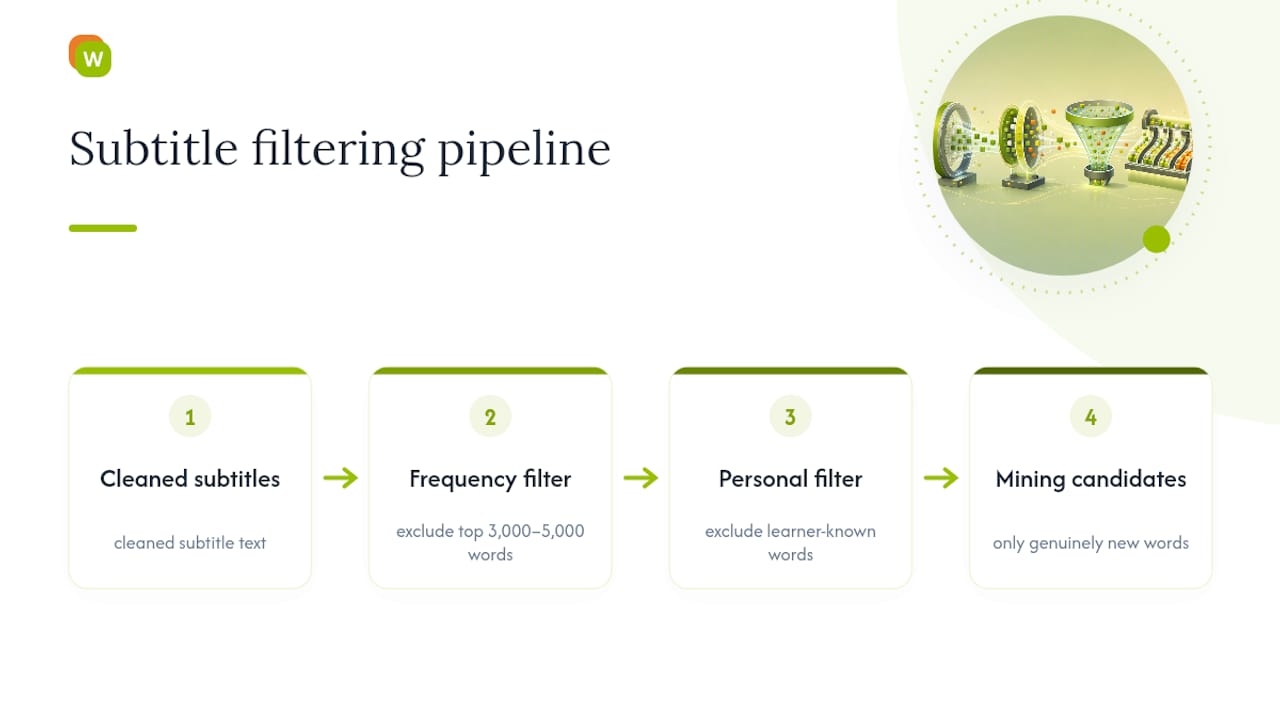
Manually scanning every subtitle line for unknown vocabulary gets tedious past your third episode of the day. Frequency-based filtering solves this by comparing subtitle text against a frequency list for the target language, the kind of ranked list linguists build from large text corpora, and flagging only words that fall outside the most common few thousand.
The logic is straightforward: high-frequency words like function words, basic verbs, and everyday nouns show up constantly, and if you’re watching native content at all, you probably already know most of them. Filtering them out means your attention goes straight to the words actually worth mining instead of re-flagging “and,” “because,” or “went” for the hundredth time.
A basic version of this filter is easy to build yourself with a spreadsheet: paste in a cleaned subtitle file, cross-reference against a frequency list, and sort by rank. Anything ranked outside your comfort threshold, say, the top 3,000 to 5,000 words for an intermediate learner, becomes a mining candidate. Anything inside that threshold gets skipped automatically.
More advanced pipelines add a second filter layer: your own known-word list, pulled from vocabulary you’ve already saved or marked as mastered. This matters because a frequency list is generic. It doesn’t know that you personally already learned an uncommon word three weeks ago from a different show. Cross-referencing against your personal vocabulary history, rather than just a general frequency list, is what actually prevents duplicate mining.
This is where an integrated tool has a real edge over a spreadsheet approach. Software that already knows your vocabulary history, like WordByWord’s comprehension level scoring, can flag only the words genuinely new to you rather than just statistically rare ones, cutting the manual filtering step out entirely.
Beyond Anki: Other Ways to Schedule Your Mined Cards
Anki dominates the sentence-mining conversation, but it isn’t the only spaced repetition system worth using, and for some learners it isn’t the best fit.
Mobile-first SRS apps built for phone use tend to lower the friction of daily review, since you’re more likely to knock out a review session waiting in line than open a desktop deck. Apps with built-in audio support matter more for subtitle-mined cards specifically, because a card without its original audio clip loses a chunk of its learning value. If your mining source is dialogue-heavy, prioritize any SRS tool that lets you attach or play back audio directly on the card, not just text and images.
Some learners split the workflow entirely: mine and clean sentences in one place, then export the finished cards into whatever review app they actually enjoy using daily. CSV export and import is the common bridge here. If your mining tool outputs a spreadsheet with sentence, target word, and audio file columns, most SRS apps will accept that structure with minor adjustments.
The bigger shift, though, is moving mining and review into the same app instead of treating them as two separate tools. WordByWord’s flashcards support voiceover and seven training modes, including typing, listening, and a 60-second sprint, scheduled automatically by spaced repetition, so a sentence you save while watching a video slots straight into your existing review queue rather than needing a separate export step. Collections built this way can also be imported from or exported to CSV, Anki, or Quizlet if you want to move vocabulary between systems.
Whatever app you land on, the deciding factor should be whether you’ll actually open it daily. A perfect SRS algorithm is worthless if the app is annoying enough that you skip review three days running.
Mining Subtitles With Multiple Languages or Dialects
Subtitle files with mixed languages or dialect variation trip up more mining workflows than most learners expect. Dual-subtitle setups, where the target language and a reference language display simultaneously, are common on language-learning platforms and can be genuinely useful for confirming meaning before you commit a sentence to a flashcard.
But mixed files create a specific risk: mining the wrong language by accident. If a subtitle track alternates between the target language and English glosses, or between a standard dialect and a regional one, tag your cards by source language immediately, not after you’ve built a backlog of fifty cards you now have to sort through.
Dialect variation matters even within a single language. Latin American Spanish subtitles and European Spanish subtitles use different vocabulary for common objects, different verb conjugations for the second person, and sometimes different sentence rhythm entirely. If you’re mining from content in one dialect but studying for exposure to another, note it on the card. Otherwise, you’ll eventually second-guess a “wrong” answer in review that was actually just a regional variant.
For learners studying more than one language at once, keeping mining sessions single-language per session avoids scrambling frequency filters and messing up which known-word list you’re checking against. If you’re working through a show with dual subtitles displayed together, mine from the target-language track and use the reference track only to confirm meaning, not as your primary source text.
Regional slang and code-switching within a single dialogue line, common in multilingual regions or immigrant-heavy media, are worth mining deliberately rather than skipping. They’re exactly the kind of vocabulary a frequency list won’t flag but native speakers use constantly.
How Do You Pick the Right Content to Mine From?
Not every video is worth mining. The best source material sits close to your comprehension level, ideally a video where you already understand 80 to 90% of what’s said without subtitles, so the unknown vocabulary stands out instead of drowning you in unfamiliar grammar on top of unfamiliar words.
Comprehension level matters more than genre. A children’s cartoon in your target language can be a better mining source than a prestige drama if the drama’s dialogue is dense and fast. Checking a video’s comprehension level before committing to it, rather than guessing from the thumbnail, saves you from abandoning half-mined episodes because the content turned out to be over your head.
Topic relevance is the second filter. Mining vocabulary from content you’re genuinely interested in means you’ll actually remember why you saved a word, which reinforces the personal-relevance factor that makes sentence mining outperform generic word lists in the first place. A cooking show teaches food vocabulary you’ll use; a true-crime documentary teaches legal vocabulary you might never touch again outside that genre.
Practical criteria worth applying before you start a mining session:
- Audio clarity: mumbled or heavily accented dialogue makes OCR and manual transcription both harder.
- Subtitle availability: confirm a real subtitle track exists before committing, especially for older or niche content.
- Episode length: shorter clips (10 to 20 minutes) are easier to mine fully without fatigue than a two-hour film.
- Series format: episodic shows let you build vocabulary progressively across episodes, reinforcing earlier mined words in new contexts.
If you’re extracting from YouTube specifically, a single well-chosen video can yield 10 to 20 solid vocabulary items without needing to mine every line.
What Makes a Good Flashcard From a Mined Subtitle Line?
A flashcard built from a bare word and its translation wastes the entire point of mining. The context is the reason you pulled the sentence in the first place, so the card needs to preserve it.
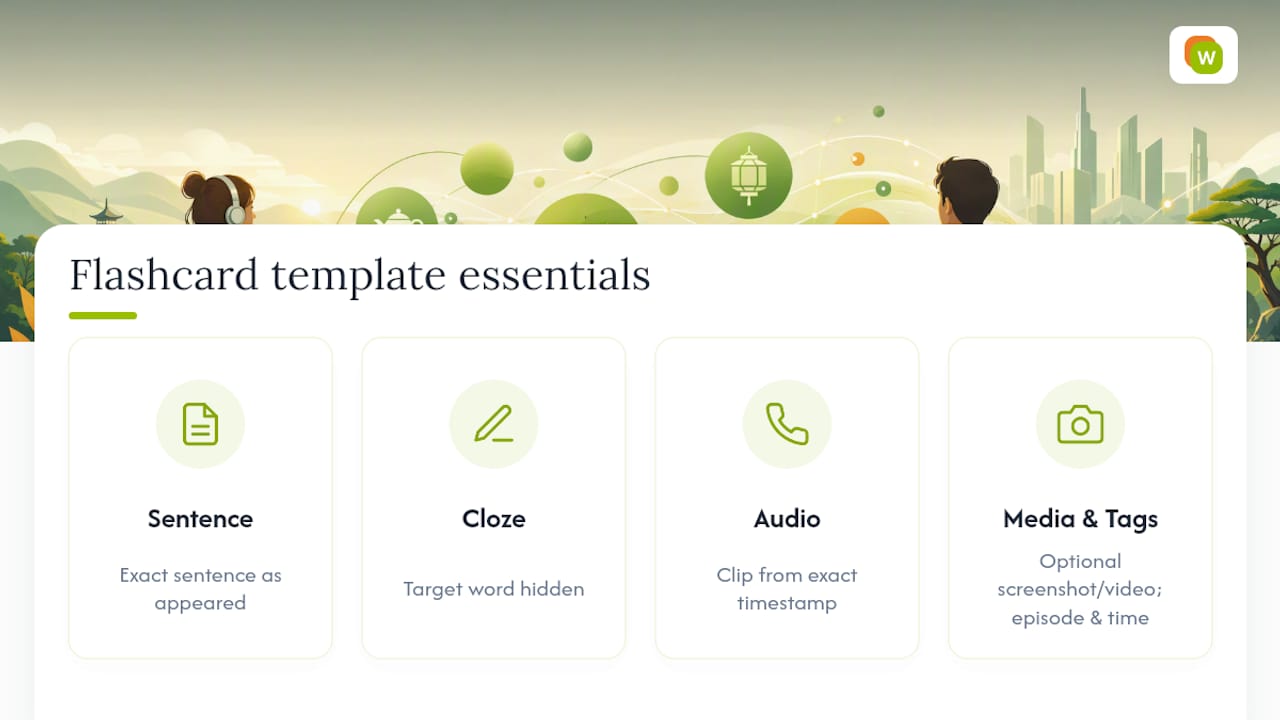
A solid subtitle-mined card template includes: the full sentence exactly as it appeared, the target word marked as a cloze deletion rather than isolated, an audio clip pulled from that exact timestamp, and, where practical, a screenshot or short video snippet showing the scene. Advanced miners go a step further and tag cards with metadata like episode number, timestamp, and a short scene description, which lets them retrace the original context and rewatch the clip if recall starts slipping during review.
Audio matters more than most learners initially assume. A written sentence alone teaches meaning and grammar, but hearing the actual line, with its rhythm, stress, and pronunciation intact, teaches how the sentence sounds in real speech. That’s a different skill than reading comprehension, and it’s one flashcards without audio simply can’t build.
Video snippets are the highest-effort version of this template and aren’t necessary for every card. Reserve them for sentences carrying visual context that matters, like idioms tied to a gesture or expression, or dialogue where tone of voice changes the meaning. For straightforward vocabulary, sentence plus audio plus a cloze deletion covers almost everything you need.
Tokenizing subtitle text into clean sentence units before building cards also prevents a common mistake: cards built from awkward mid-sentence fragments. Treating each subtitle line as a proportional time slice of the whole scene makes it easier to select lines with natural prosody, the kind that actually sound like something a native speaker would say, rather than a choppy fragment split by a subtitle timing rule.
Manual Toolchain or Integrated App: Which Should You Use?
Batch processing, research work, and detailed retiming genuinely call for a manual pipeline. If you’re mining an entire season at once or fixing systematic timing errors across a whole file, dedicated extraction and cleaning tools give you more control.
Daily mining, though, is a different job. If you’ve got five to ten minutes and want to pull vocabulary from whatever you’re watching that day, an integrated tool that handles lookup, saving, and flashcard creation in one motion beats juggling separate apps. Decide based on volume and frequency: occasional deep batches favor manual tools, daily microlearning favors an integrated one.
— WordByWord Team
Start Mining Subtitles Without the Extra Steps
Subtitle mining can be simplified by tools that combine the extraction, cleaning, and flashcard-building steps into a single browser action. Instead of pulling a subtitle file, cleaning it, and exporting to a separate SRS app, some tools allow you to save sentences with context directly from video subtitles and schedule them for review.
The browser extension works across YouTube subtitles, websites, and PDFs in over 50 languages, so the same mining habit you build on one video carries over to everything else you read or watch. Some tools include features that highlight which words are already known before viewing and indicate if content matches a user’s comprehension level.
Certain language learning platforms offer free tiers with usage limits that let users test subtitle mining workflows before considering premium plans with extended features. Install the extension for language learners and mine your next video the easy way.
Sources
- Subtitle Edit Rate (SubER) — ACL Anthology (2022)
- Geeklink
- subtools: Subtitle text analysis vignette — CRAN
FAQ
What Does “Sentence Mining” Mean?
Sentence mining means extracting full sentences from native content, usually ones containing exactly one unknown word, and saving them as flashcards instead of studying isolated vocabulary lists. It preserves context and personal relevance, both of which strengthen retention compared to generic word lists.
How Do You Sentence Mine Using a Browser Tool Like Yomitan?
Browser-based lookup tools let you click an unknown word in a webpage, video subtitle, or document to get an instant definition, which you then save along with the full sentence for later review. WordByWord follows the same principle across YouTube subtitles, PDFs, and websites, pairing the lookup with automatic flashcard creation and spaced repetition scheduling.
What’s the Difference Between Softsubs and Hardsubs?
Softsubs are separate text tracks, like SRT or VTT files, that you can copy and edit directly. Hardsubs are burned into the video image itself and require OCR to convert into an editable format.
How Many Words Should You Mine Per Video?
Most learners get steady results mining a moderate number of new words per session, since larger batches tend to overload spaced repetition review schedules within a week.
Why Do Subtitle Timing Errors Matter for Mining?
Poorly segmented or mistimed subtitles often produce incomplete or garbled sentences, which makes them harder to learn from. Metrics like SubER were built specifically because timing and segmentation affect usability as much as text accuracy does.